What is the Hubble Source Catalog (HSC)? What data does it contain?
 The Hubble Source Catalog (HSC) combines the tens of thousands of
visit-based, general-purpose source lists in the Hubble Legacy Archive (HLA)
into a single master catalog.
The Hubble Source Catalog (HSC) combines the tens of thousands of
visit-based, general-purpose source lists in the Hubble Legacy Archive (HLA)
into a single master catalog.
Version 1 of the HSC contained members of the WFPC2, ACS/WFC, WFC3/UVIS, and WFC3/IR Source Extractor source lists from HLA version DR8 that were public as of June 1, 2014.
Version 2 contained source lists from the same instruments, but using HLA version DR9.1 images (i.e., public as of June 9, 2015.)
Version 3 includes source lists from the HLA version DR10 images (i.e., public as of October 1, 2017.)
See What is new in version 3.1 and What is new in version 3 below for more details about improvements and enhancements made to Version 3. Both Version 1 and Version 2 of the HSC will continue to be available, but Version 3 is preferred due to substantial improvements in its photometric and astrometric accuracy.
What is new in Version 3.1 of the Hubble Source Catalog?
Most information in v3.1 is unchanged from v3. HSC v3.1 adds to HSC v3 by providing proper motions of over 400,000 objects in the augmented Sagittarius Window Eclipsing Extrasolar Planet Search (SWEEPS) HST field. This field is within a few degrees of the Galactic center, and most of the stars belong to the Galactic bulge. The field has been observed by ACS and WFC3 with a time baseline as long as 12 years. The proper motion information is available in the form of database tables within the HSCv3 context of the STScI CasJobs interface. The data can be readily queried by means of SQL through that interface. In addition, we provide a Python Jupyter notebook that shows how to access CasJobs via a script. The notebook provides statistical information about the photometry and proper motions and includes some science use cases. More details are found here.
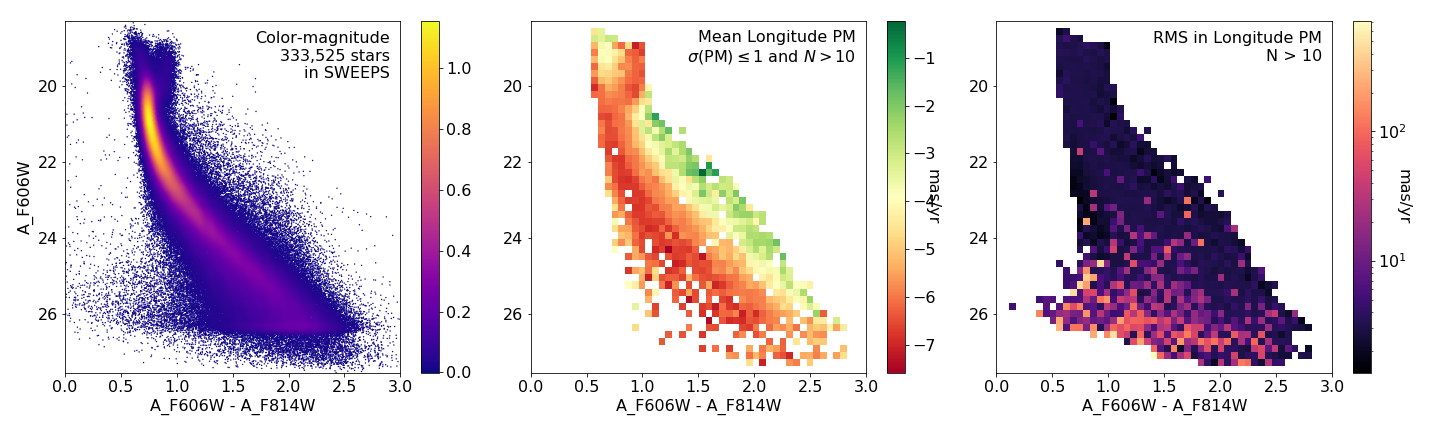 |
| Mean proper motions as a function of color and magnitude in the SWEEPS field. The left panel shows the color-magnitude distribution with the color bar indicating the density of points. The center panel shows the mean PM in longitude, which varies systematically across the main sequence due to changes in distance to the stars. The right panel shows the PM RMS, which increases significantly below the main sequence due especially to the presence of nearby white dwarfs, which have larger apparent random motions. This figure can be calculated quickly from the HSCv3 (see our Python Jupyter notebook for details.) |
What is new in Version 3 of the Hubble Source Catalog?
The primary new items for Version 3 are:
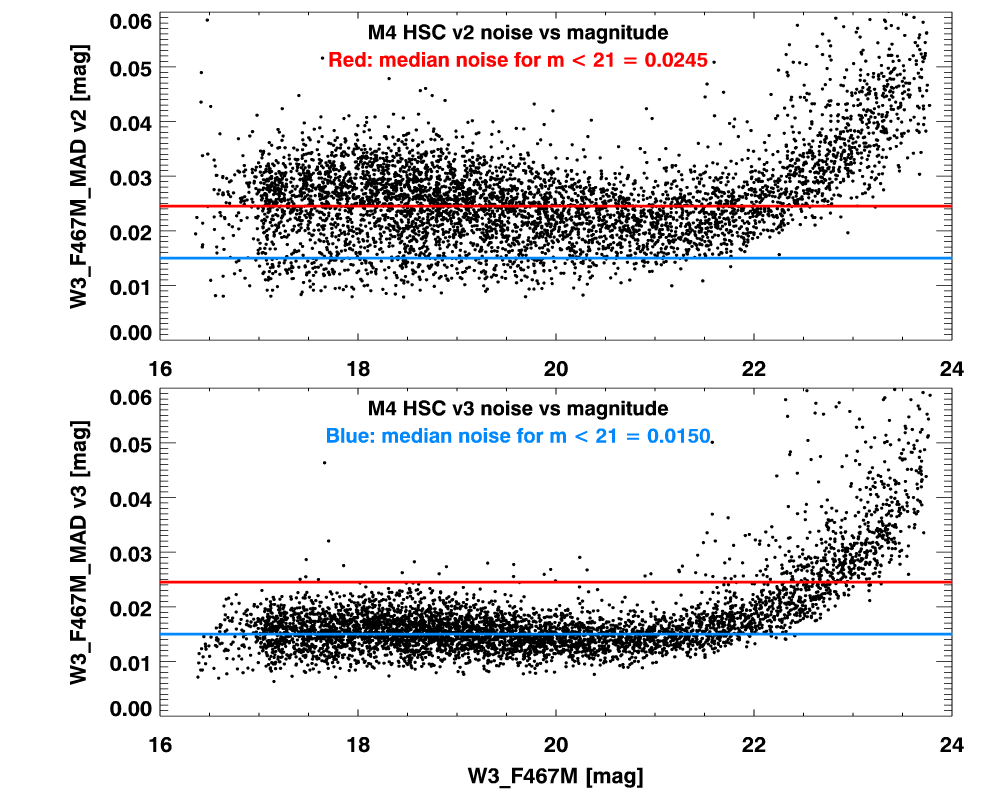 |
| Comparison of noise as a function of magnitude in globular cluster M4 for HSC v2 (top) and HSC v3 (bottom). The plot includes 5300 objects that have more than 50 measurements in the W3_F467M filter. This field was affected by image alignment problems that have been corrected in HSC v3. The result is much-improved photometry. |
What are five things you should know about the HSC?
NOTE: The graphics in this section are from version 1 unless otherwise indicated.
1. Detailed HSC use cases and videos are available to guide you.
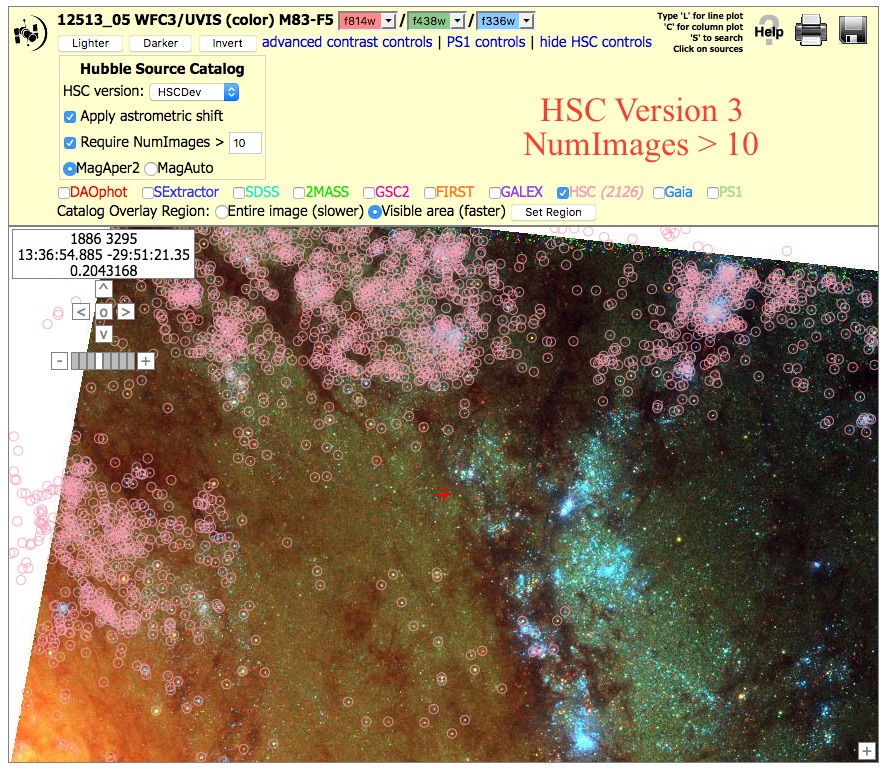
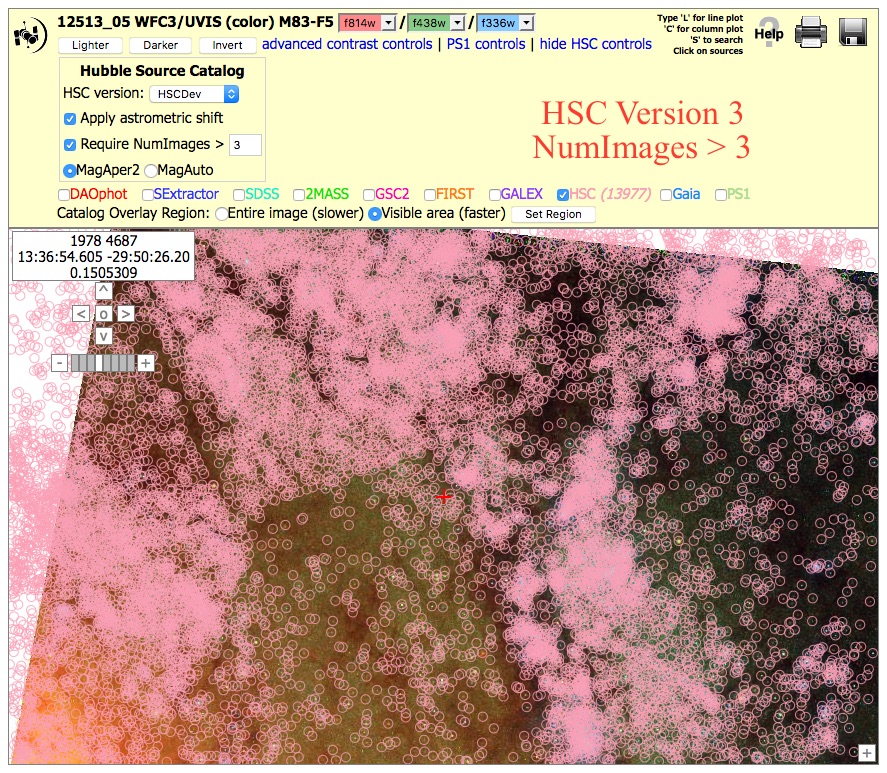
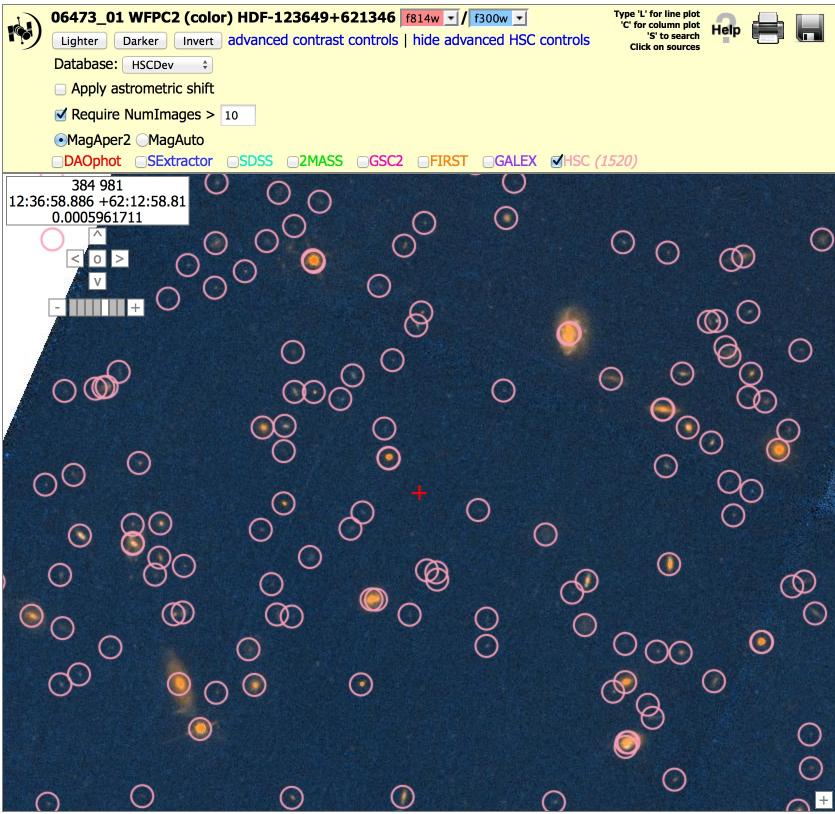
2. Coverage can be very non-uniform (unlike surveys like SDSS), since pointed observations from a wide range of HST instruments, filters, and exposure times have been combined. However, with proper selection of various parameters (e.g., NumImages included in a match), this non-uniformity can be minimized in most but not all cases. In the example below, the first image (with NumImages > 10) shows a very nonuniform catalog, while the second image (with NumImages > 3) is better (although it still shows regions of uneven coverage due to different image locations).
3. WFPC2 source lists are of poorer quality than ACS and WFC3 source lists. As we have gained experience, the HLA source lists have improved. For example, many of the earlier limitations (e.g., depth, difficulty finding sources in regions of high background, edge effects, photometric bias due to image alignment problems, ...) were fixed in the WFC3 and ACS source lists for version 3. These improved algorithms have not yet been used for WFPC2.
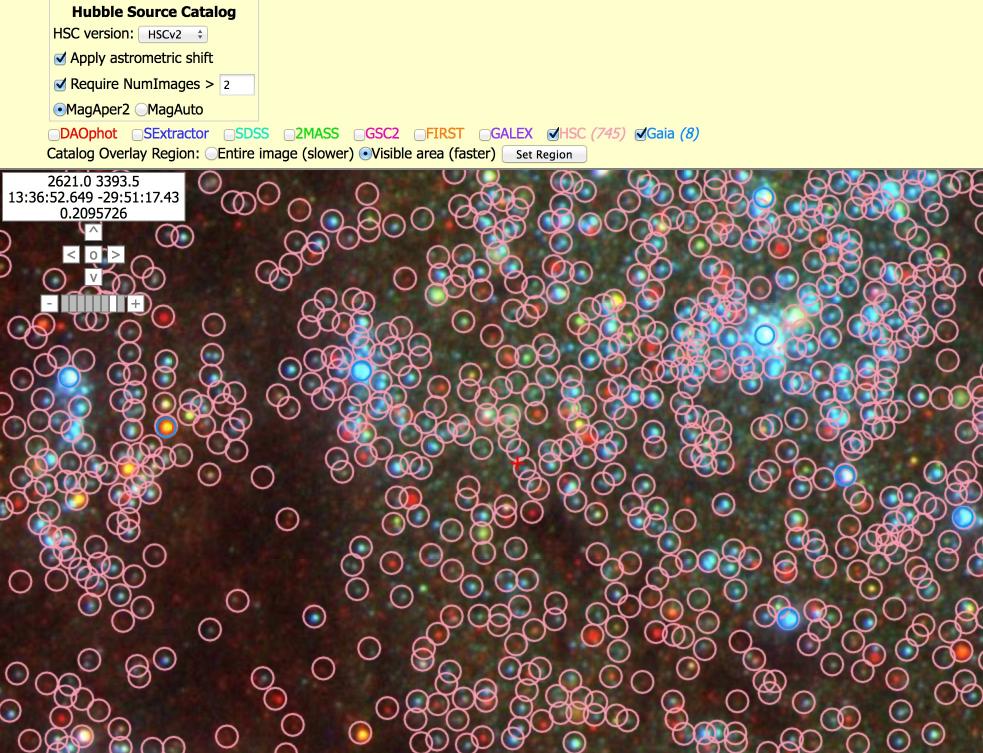
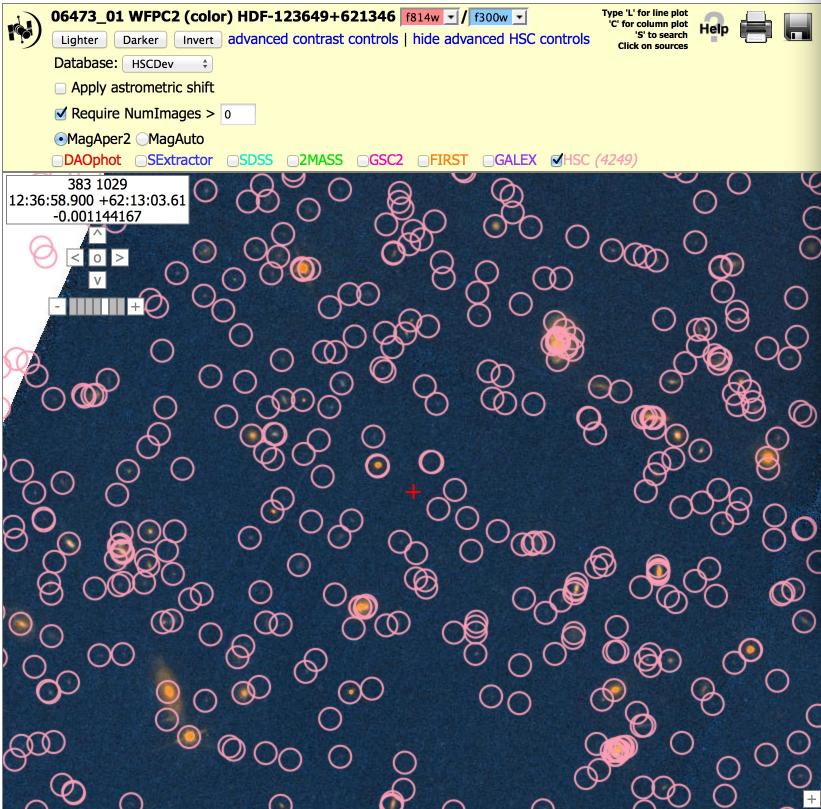
4. The default is to show all HSC objects in the catalog. This may include a number of artifacts. You can request Numimages > 1 (or more) to filter out many of the artifacts. In the example below we show part of the Hubble Deep Field (HDF). With NumImages > 0 on the left, a number of the points look questionable (e.g., several of the circles to the right of the red cross have NumImages = 1 or 2, and look blank). Even the faint sources in this particular field have NumImages in the range 10 - 20, hence a value of NumImages > 10 is more appropriate.
5. The default is to use MagAper2 (aperture magnitudes), generated using Source Extractor (Bertin & Arnouts 1996) software. If required for your science needs, you will need to add aperture corrections to estimate total magnitudes. These can be found in the Peak of Concentration Index for Stars and Aperture Correction Table.
You can also request MagAuto values if you would like to use the Source Extractor algorithm for estimating the total magnitude. This is especially appropriate for extended sources.
All HLA (and hence HSC) magnitudes are in the ABMAG system. Here is a discussion of the ABMAG, VEGAMAG and STMAG systems. A handy, though not exact conversion for ACS is provided in Sirianni et al. (2005). The Synphot package provides a more generic conversion mechanism for all HST instruments.
Where can I find examples of good and bad regions of the HSC?
NOTE: Unless otherwise noted (in red), the images in this section are from HSC version 1.
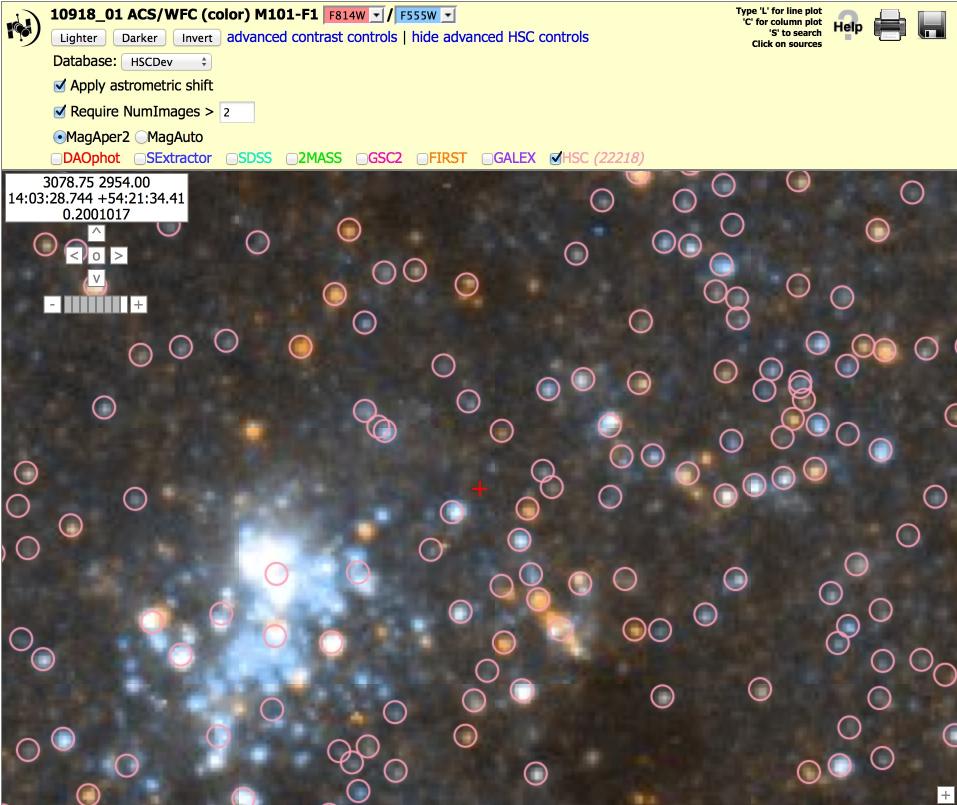
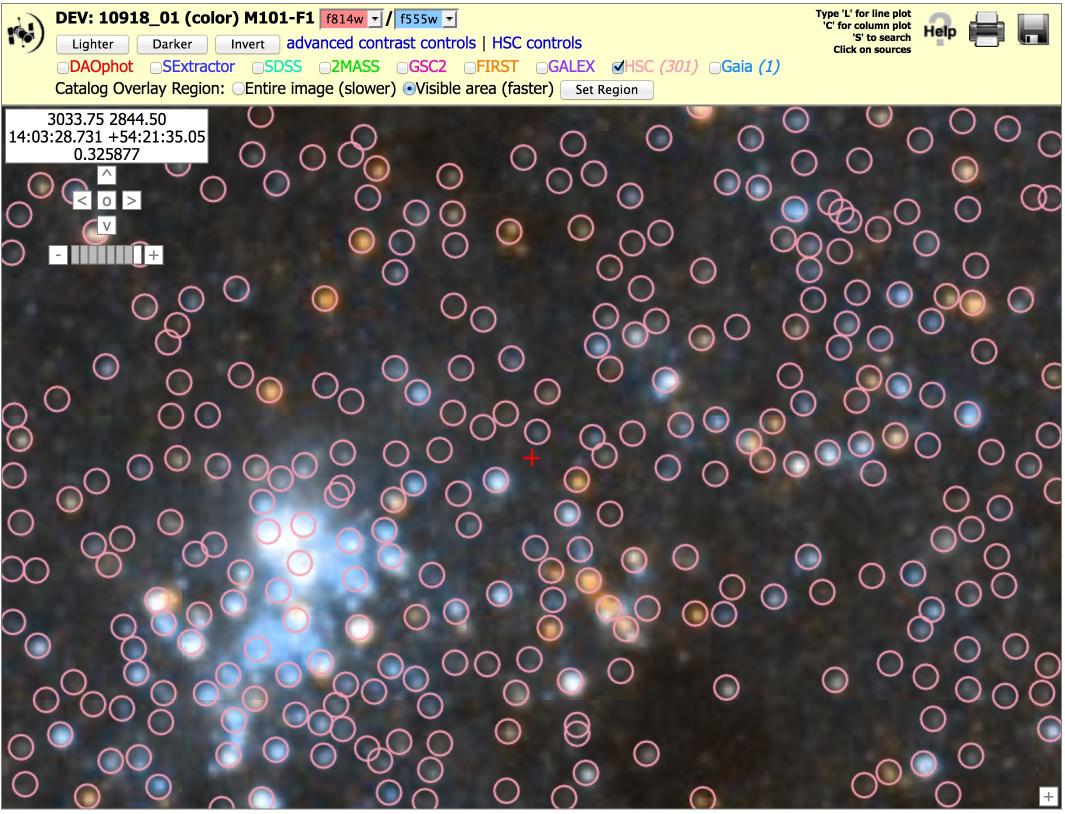
 Nearby galaxy: ACS, M101 (10918_01), N > 2 version
To get the image at right, click on "Advanced HSC controls", then
check the box for "Require NumImages > 2", then click on HSC.
Nearby galaxy: ACS, M101 (10918_01), N > 2 version
To get the image at right, click on "Advanced HSC controls", then
check the box for "Require NumImages > 2", then click on HSC.
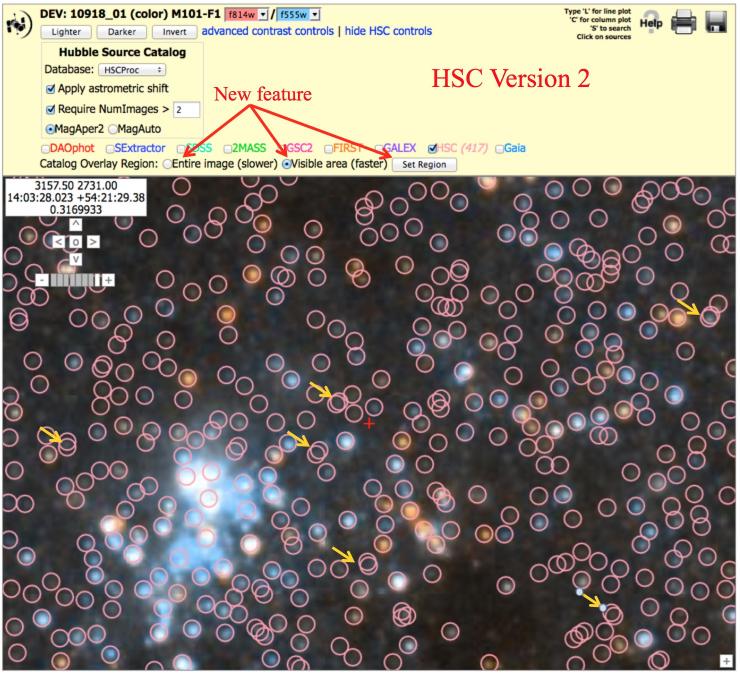
Note the yellow arrows that show that there is sometimes more "doubling" seen in version 2 images, primarily because of the inclusion of fainter ACS sources. See known problems #2 for a discussion on doubling.
Note that HSC version 2 has many more sources.
There is also a new feature which allows you to plot only the objects visible in the particular region you have selected. This greatly increases the speed needed to plot the points. Click on either the "Entire image" or "Visible area", and then click "Set Region".
Note that it is now possible to overlay Gaia sources.
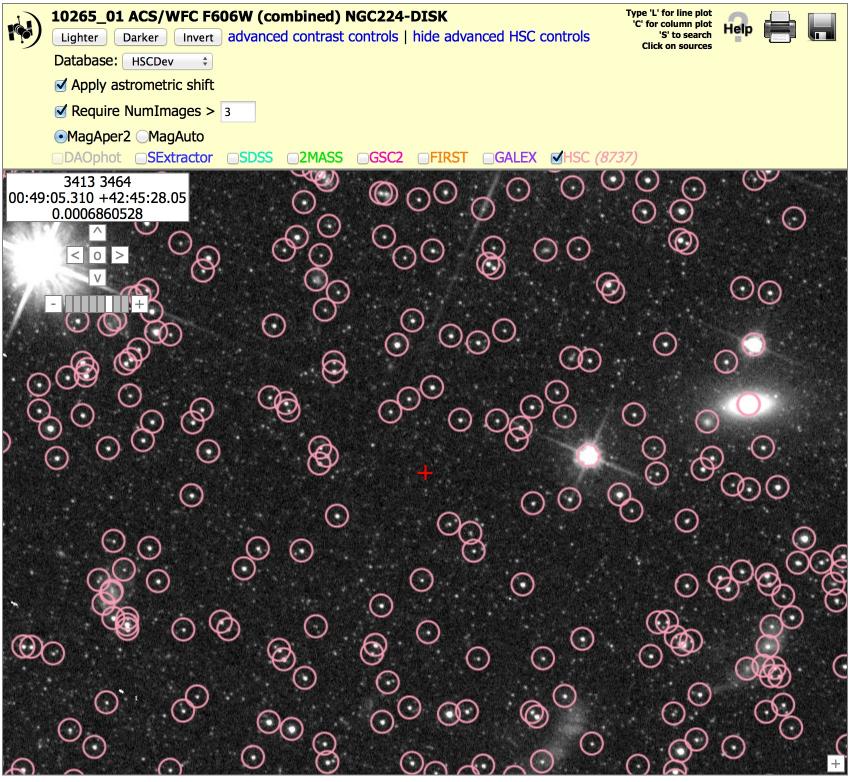
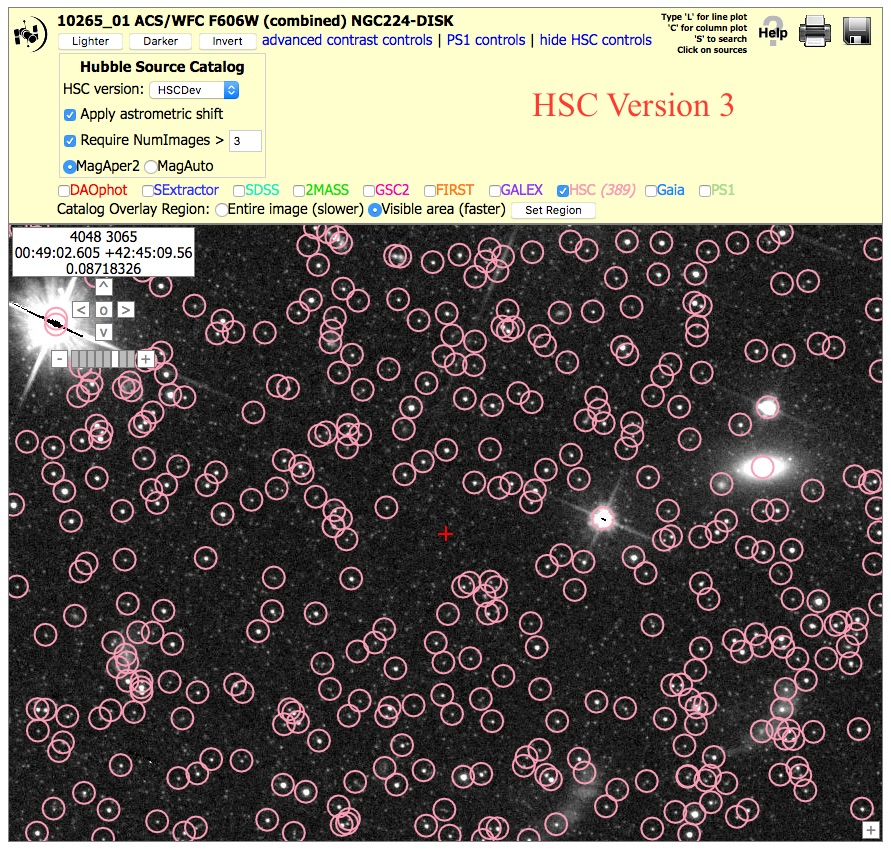 Star field: ACS, M31 (10265_01), N > 3 version
To get the image at right, click on "Advanced HSC controls", then
check the box for "Require NumImages > 3", then click on HSC.
Star field: ACS, M31 (10265_01), N > 3 version
To get the image at right, click on "Advanced HSC controls", then
check the box for "Require NumImages > 3", then click on HSC.
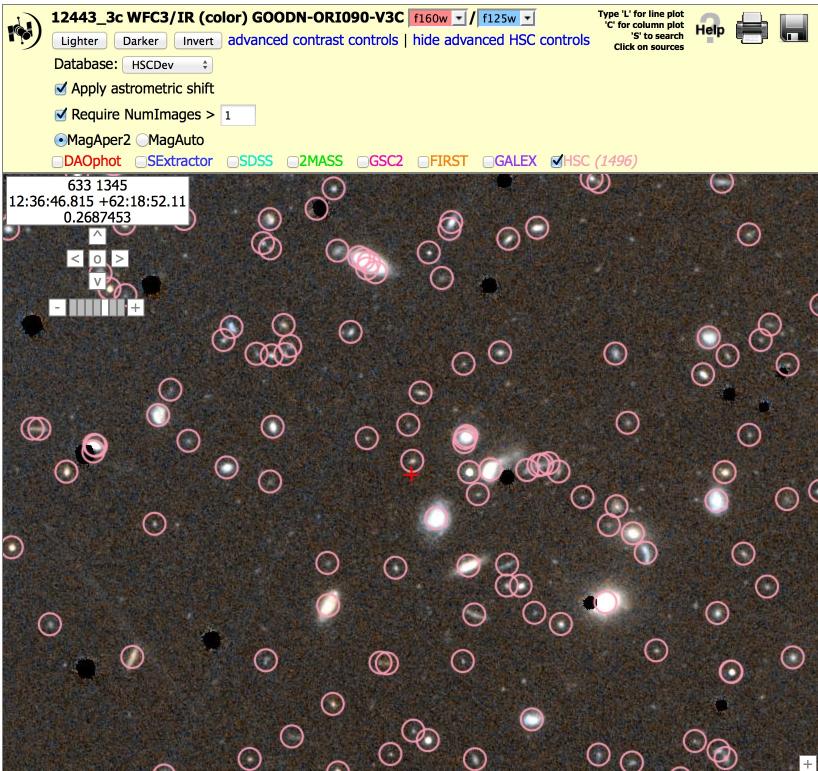
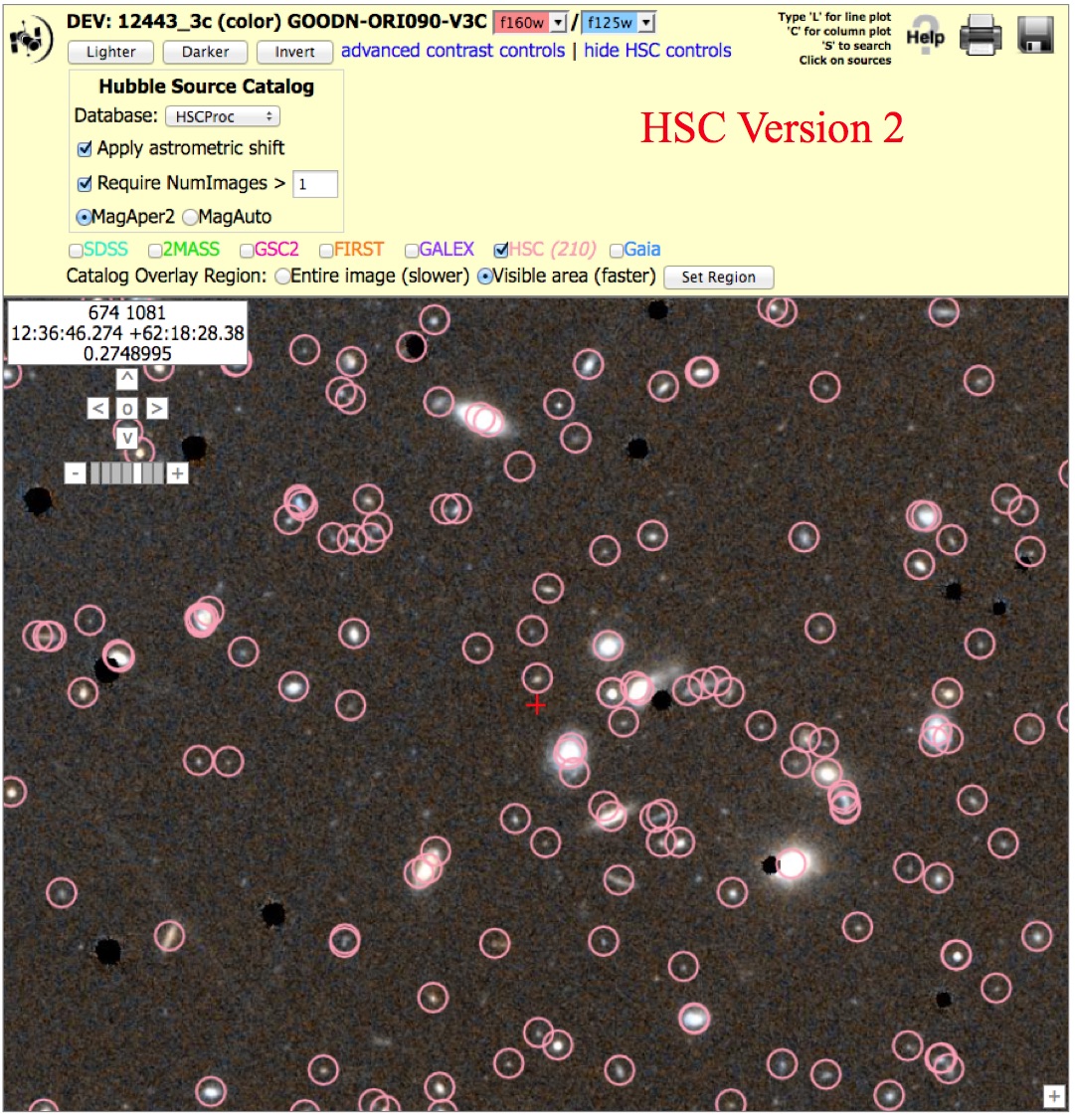 Field of faint galaxies: WFC3/IR, (12443_3c), N > 1 version
To get the image at right, click on "Advanced HSC controls", then
check the box for "Require NumImages > 1", then click on HSC.
Field of faint galaxies: WFC3/IR, (12443_3c), N > 1 version
To get the image at right, click on "Advanced HSC controls", then
check the box for "Require NumImages > 1", then click on HSC.
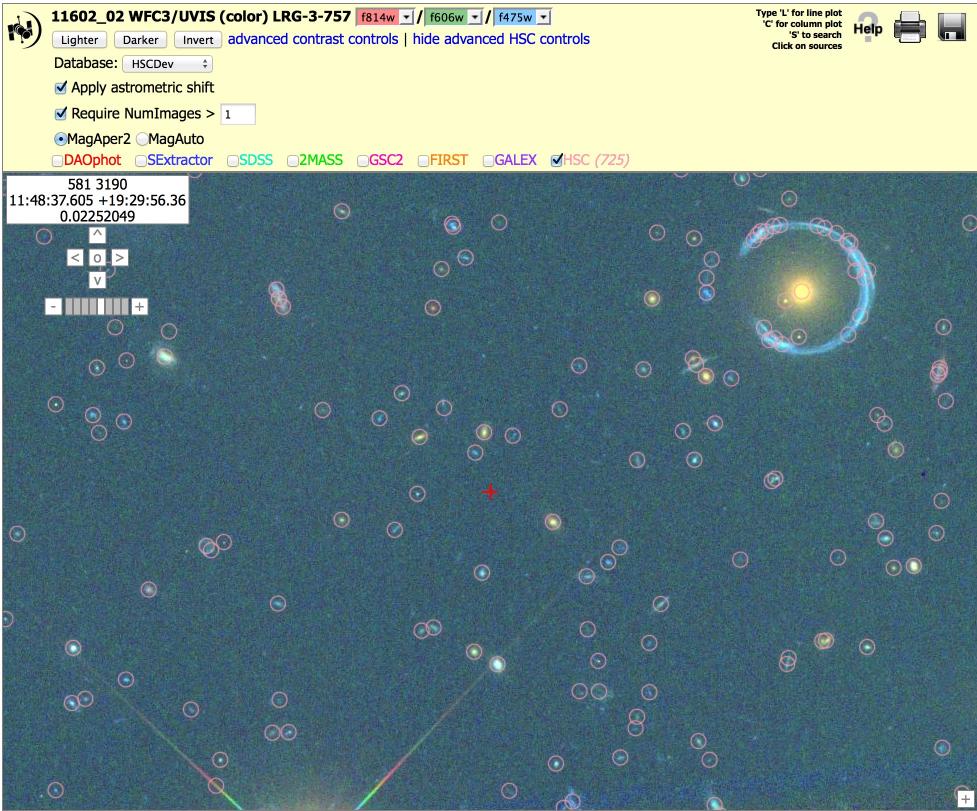
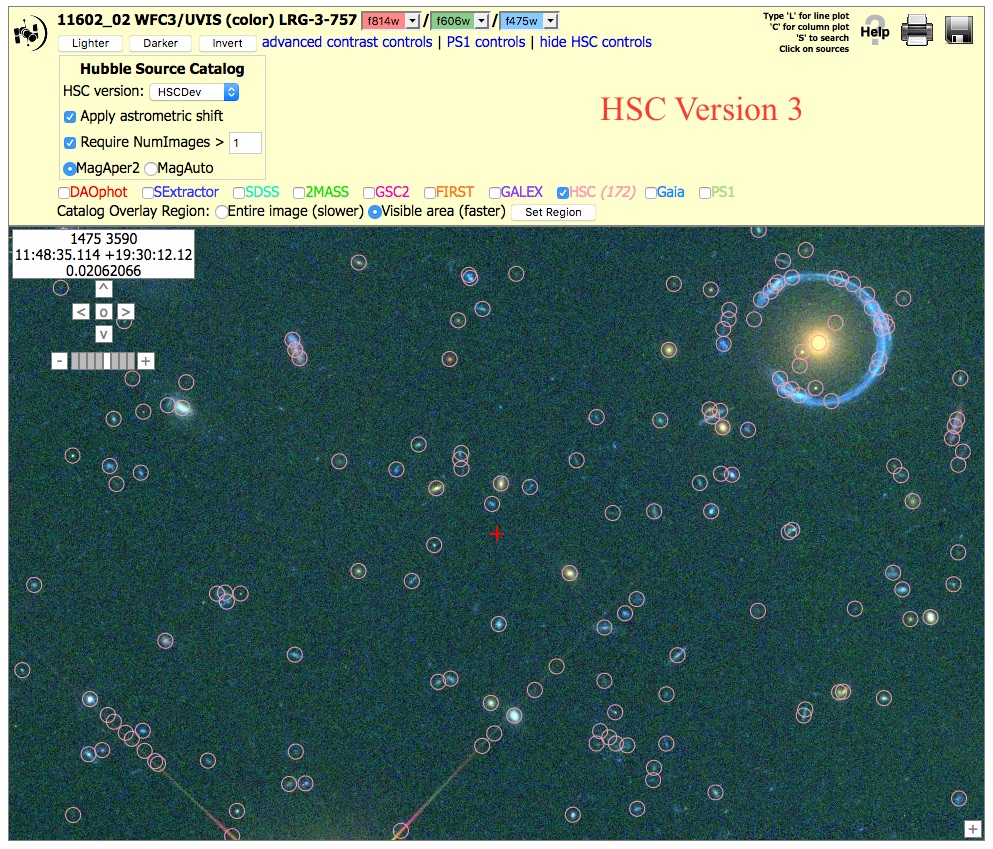 Gravitational Lens: WFC3/UVIS, (11602_02), N > 1 version
To get the image at right, click on "Advanced HSC controls", then
check the box for "Require NumImages > 1", then click on HSC.
Gravitational Lens: WFC3/UVIS, (11602_02), N > 1 version
To get the image at right, click on "Advanced HSC controls", then
check the box for "Require NumImages > 1", then click on HSC.
Note the presence of artifacts along the outer part of the diffraction spikes in the version 3 image. This is primarily due to going deeper for the ACS images. It is often possible to remove these by using the appropriate value of the NumImages criteria.
Also note that there are more sources measured around the gravitational ring, again resulting from the fact that the ACS images go deeper in version 3.
Nearby Galaxy WFC3/UVIS, (12513_05), N > 10 and 3 versions.
To get the image at right, click on "Advanced HSC
controls", then
check the box for "Require NumImages > 10",
then click on HSC. Repeat this with "Require NumImages > 3"
This shows an example where a choice of NumImages > 10 can result in a very nonuniform catalog, while NumImages > 3 results in a more uniform catalog (although it still shows regions of uneven coverage due to different image locations). Because of the strong sensitivity to the choice of NumImages, this is considered a mixed quality catalog.
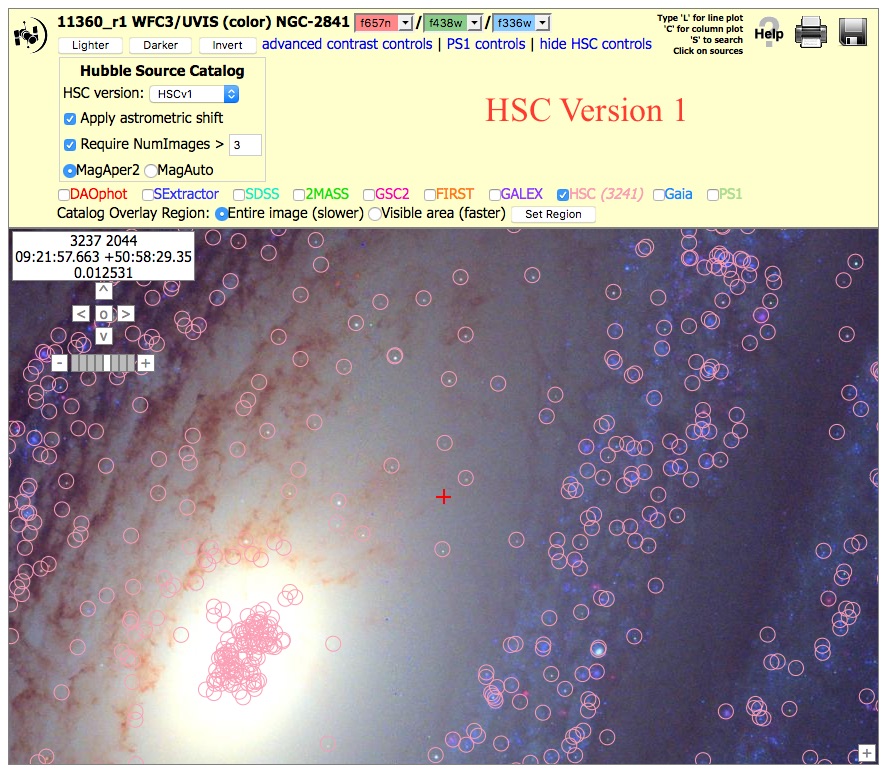
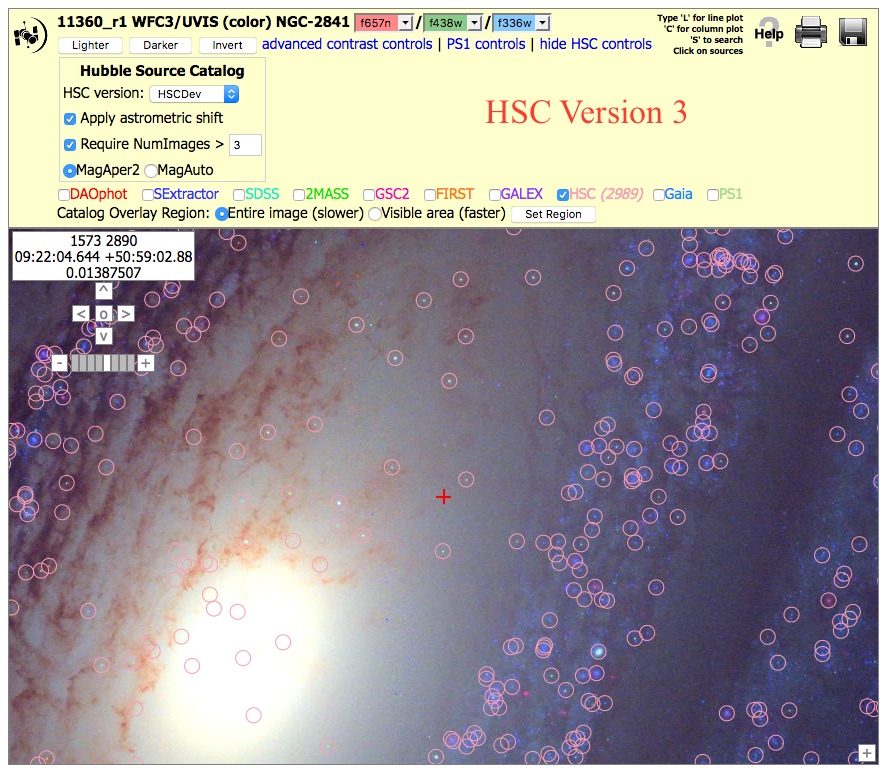 Nearby Galaxy WFC3/UVIS, (11360_r1), HSCv1 and HSCv3 versions.
To get the image at right, click on "Advanced HSC controls", then
check the box for "Require NumImages > 3", then click on HSC.
Nearby Galaxy WFC3/UVIS, (11360_r1), HSCv1 and HSCv3 versions.
To get the image at right, click on "Advanced HSC controls", then
check the box for "Require NumImages > 3", then click on HSC.
This shows an example (at far right) where the HSCv1 catalog has many false sources near the nucleus of the galaxy. The results can be improved by increasing the limit to NumImages > 5, but that also results in the loss of many real sources. For this reason we considered this a mixed quality catalog in version 1.
However, note that this problem is fixed in version 3, and so this region has changed from a Mixed to a Good example!
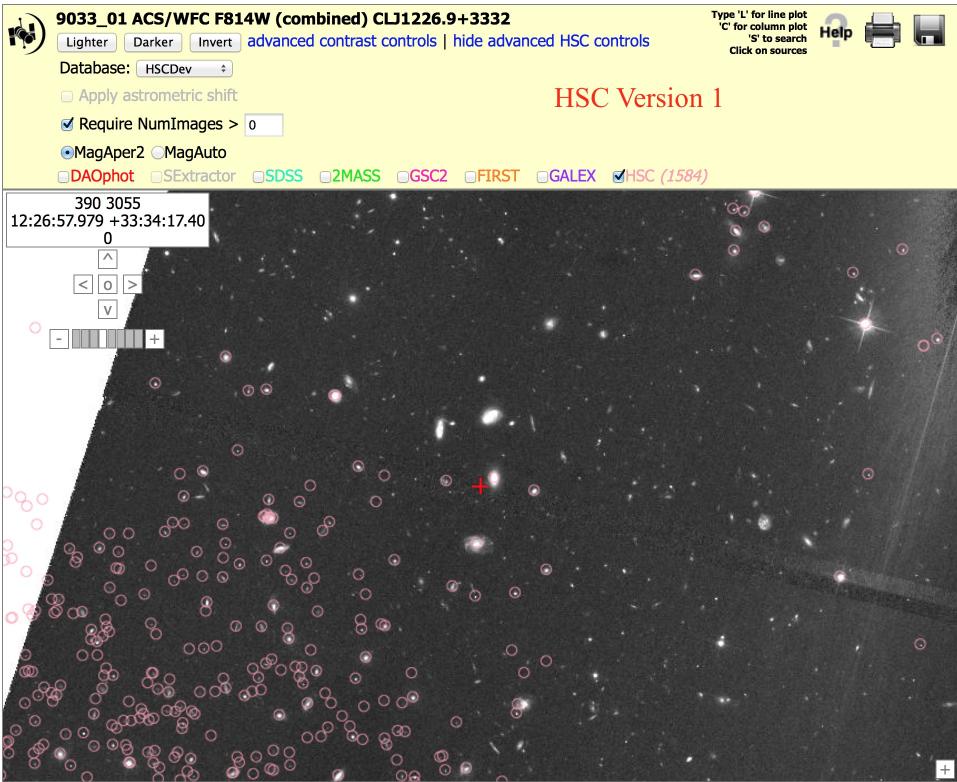
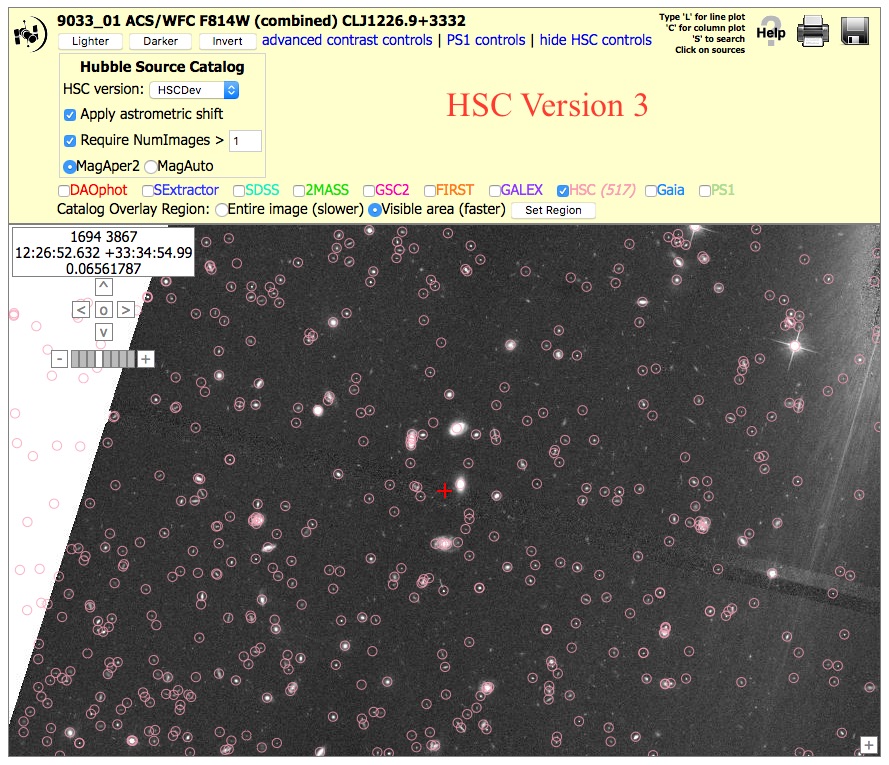 Field of Galaxies: ACS (9033_01), N > 0 version.
To get the image at right, click on "Advanced HSC controls", then
check the box for "Require NumImages > 0", then click on HSC.
Field of Galaxies: ACS (9033_01), N > 0 version.
To get the image at right, click on "Advanced HSC controls", then
check the box for "Require NumImages > 0", then click on HSC.
In version 1 (far right), the problem was that no Source Extractor source list was produced by the HLA for this particular image, and hence the HSCv1 catalog partway across the image. Obvious galaxies in the center of this field are missing from the HSCv1. This can be seen by the fact that the SExtractor check box is greyed out. There are many reasons why a source list might be missing in the HLA. In this case it is probably because there is an extremely bright star just to the right of this field,
However, note that this problem has been fixed since version 2, and so this region is another case that changed from a Bad to a Good example!
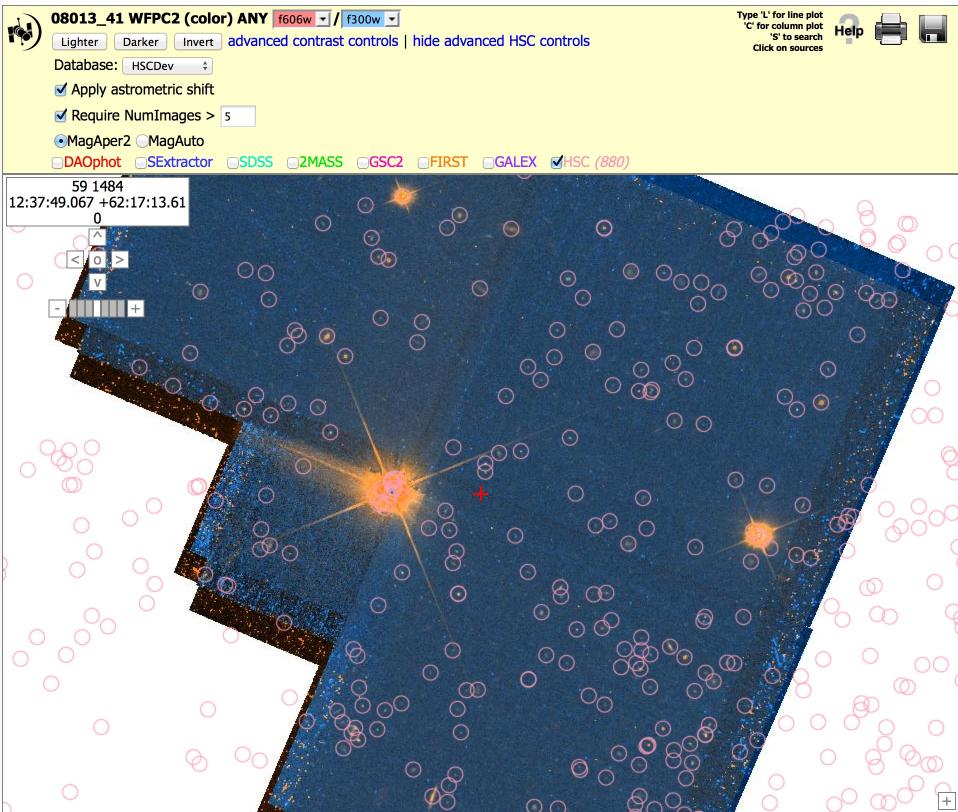
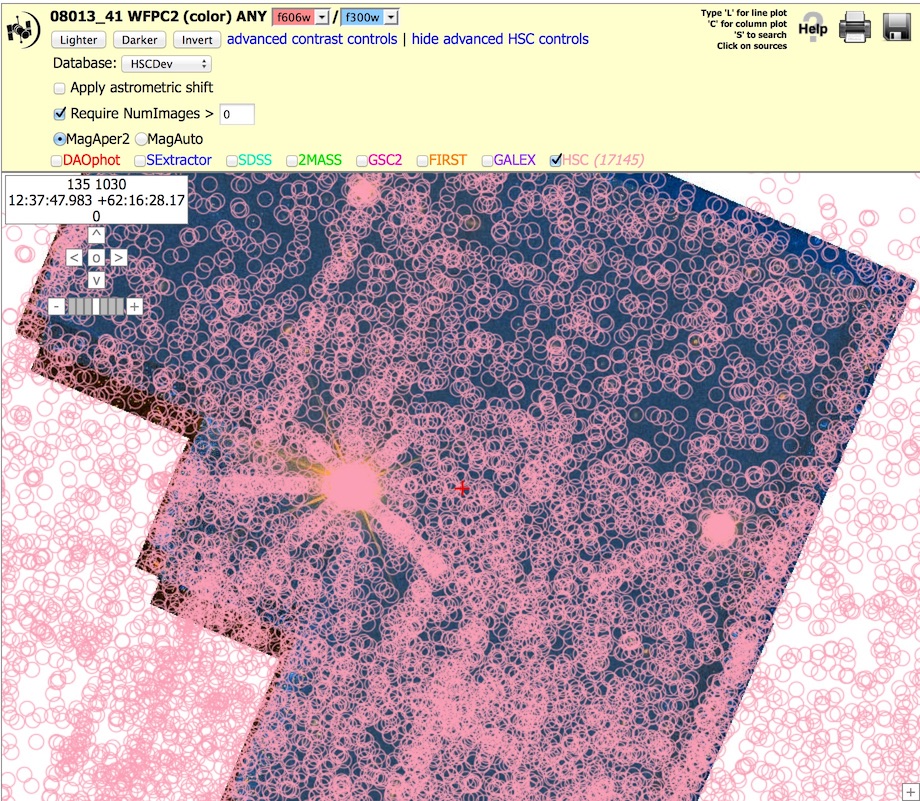 Starfield: WFPC2 (8013_41), N > 0 and 5 versions.
To get the image at right, click on "Advanced HSC controls", then
check the box for "Require NumImages > 0", then click on HSC. Repeat this
with "Require NumImages > 5".
Starfield: WFPC2 (8013_41), N > 0 and 5 versions.
To get the image at right, click on "Advanced HSC controls", then
check the box for "Require NumImages > 0", then click on HSC. Repeat this
with "Require NumImages > 5".
This shows a field with a large number of artifacts in a WFPC2 field when using NumImages > 0, both because of the bright stars in the field and various edge effects. While using NumImages > 5 removes many of these artifacts, it is not possible to remove all of them without also removing many of the real sources.
NOTE: These figures are from version 1. Version 3 looks fairly similar since the WFPC2 images and source lists have not been redone.
What are the primary "known problems" with HSC Version 3?
Known Problem # 1
- Artifacts around bright stars and along diffraction spikes
These often appear to be more prevalent in versions 2 and 3 compared to version 1, for example near the ends of the diffraction spikes in the image of the gravitational lens (11602_02) shown here. This is primarily due to going deeper for the ACS images in version 3. It is generally possible to remove these by using the appropriate value of the NumImages criteria.
 Known Problem # 2
- "Doubling"
Known Problem # 2
- "Doubling"
There are occasionally cases where not all the detections of the same source are matched together into a single objects. In these cases, more than one match ID is assigned to the object, and two pink circles are generally seen at the highest magnification in the display, as shown by the yellow arrows in the example. Most of these are very faint objects, and the primary reason there are more in version 2 compared to version 1 is the deeper ACS source lists.
These "double objects" generally have very different numbers of images associated with the two circles. Hence, this problem can often be handled by using the appropriate value of NumImages to filter out one of the two circles. For example, using Numimages > 9 for this field removes essentially all of the doubling artifacts, at the expense of loosing the faintest 25 % of the objects (see figure on right).
Interestingly, while investigating the doubling artifact we found that some cases are due to the proper motion of the star ! These can generally be separated from cases where the doubling is due to poor matching by examining the range of dates of the observations for the two circles. An example of this is currently being written up as a use case which will be included in the future.
Known Problem # 3 - PC and WFC objects are combined for the WFPC2
Aperture magnitudes for objects on the PC (Planetary Camera) portion of the WFPC2 differ (typically by 0.2 to 0.3 magnitudes) when compared to the same object when it is on the WF (Wide Field) portion of the WFPC2, resulting in additional scatter for the WFPC2 data. This is caused by a variety of reasons including: 1) the pixel scale on the PC is half the size of the WF - while resampling adjusts for this to some degree, it does not fully compensate, 2) Charge Transfer Efficiency loss (CTE) is much higher on the PC due to the lower flux in the smaller pixels. In V2. Information about which chip the object is found on is stored in a table (named WFPC2PCFrac) that is available via CasJobs. However, this information is not currently used when computing the normalized concentration index (CI) or magnitudes of sources in the summary form.
How are HLA images and source lists constructed?
The Hubble Source Catalog (HSC) is based on HLA Source Extractor (Bertin & Arnouts 1996) source lists. To build these source lists, the HLA first constructs a "white light" or "detection" image by combining the different filter observations within each visit for each detector. This filter-combined drizzled image provides added depth. Source Extractor is run on the white light detection image to identify each source and determine its position.
Next, the combined drizzled image for each filter used in the detection image is checked for sources at the positions indicated by the finding algorithm in Source Extractor. If a valid source (flags less than 5) - is detected at a given position then its properties are entered into the HLA source list appropriate for the visit, detector, and filter. (See HLA Source List FAQ for a definition of the flagging system for HLA source lists.) These are defined as level 0 detections, and are reported in the HSC Detailed Table to have a value of Det = Y.
Sources that are found in the white light detection image, but not in a particular filter used to make the white light image, are regarded as "filter-based nondetections". These have Det = N in the Detailed Table.
NOTE: Currently the HSC search form does not show non-detections for direct cone searches of the Detailed Table but does include them in the lists of measurements for a specific MatchID. In the future we plan to make it easier to search for non-detections through search form. We will also add the capability of finding "Visit-based nondetections", which are cases where an image overlaps with the specified positional search constraints, but no sources are detected there.
More details about how HLA images are constructed can be found at the HLA Images FAQ. More details about how HLA source lists are constructed can be found at the HLA Source List FAQ.
A general outline of the entire process of making the HSC is available in section 3.1 of Whitmore et al. 2016.
How are "matches" defined in the HSC? What is the algorithm that combines the sources?
The source detections (and nondetections) that correspond to the same physical object (as determined by the algorithms defined in Budavari & Lubow 2012) are given a unique MatchID number and an associated match position (MatchRA, MatchDec). Each member of the match, including nondetections, also has an assigned MemID value and a source position (SourceRA, SourceDec). As part of the matching process, astrometric corrections are made to overlapping images. Each source detection and nondetection has a separation distance, D (small d in the plots below), from the match position.
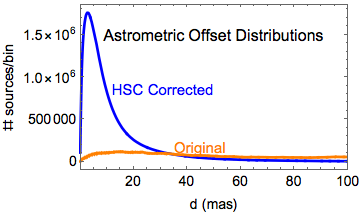
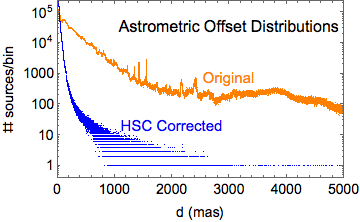
The two plots show (in blue) the distribution of the relative astrometric errors in version 3 of the HSC corrected astrometry, as measured by the positional offsets of the sources contributing to multi-visit matches from their match positions. Plotted in orange are the corresponding distributions of astrometric errors based on the original HST image astrometry. The areas under the blue and orange curves in the left plot are the same, but the original distribution (orange curve) has a long tail that extends far beyond the limits of the plot.
The left plot is on a much smaller distance scale than the right plot. Furthermore, the right plot has a logarithmic vertical scale. In version 3, the peak (mode) of the HSC corrected astrometric error distribution is 3.0 mas, while the median offset is 7.6 mas. The original (current HST) astrometry has corresponding values of 6.8 mas and 160 mas, respectively. See the astrometry discussion for more details.
To summarize, the relative astrometric error distribution in the original HST images has a long tail that has been greatly reduced by the HSC corrections.
What is the HSC Detailed Search Form?
Although the primary way to access the HSC is through the MAST Discovery Portal, as discussed in the next section, we begin with a look at the HSC Detailed and Summary Search Forms, since it helps clarify what we mean by a match in the HSC.
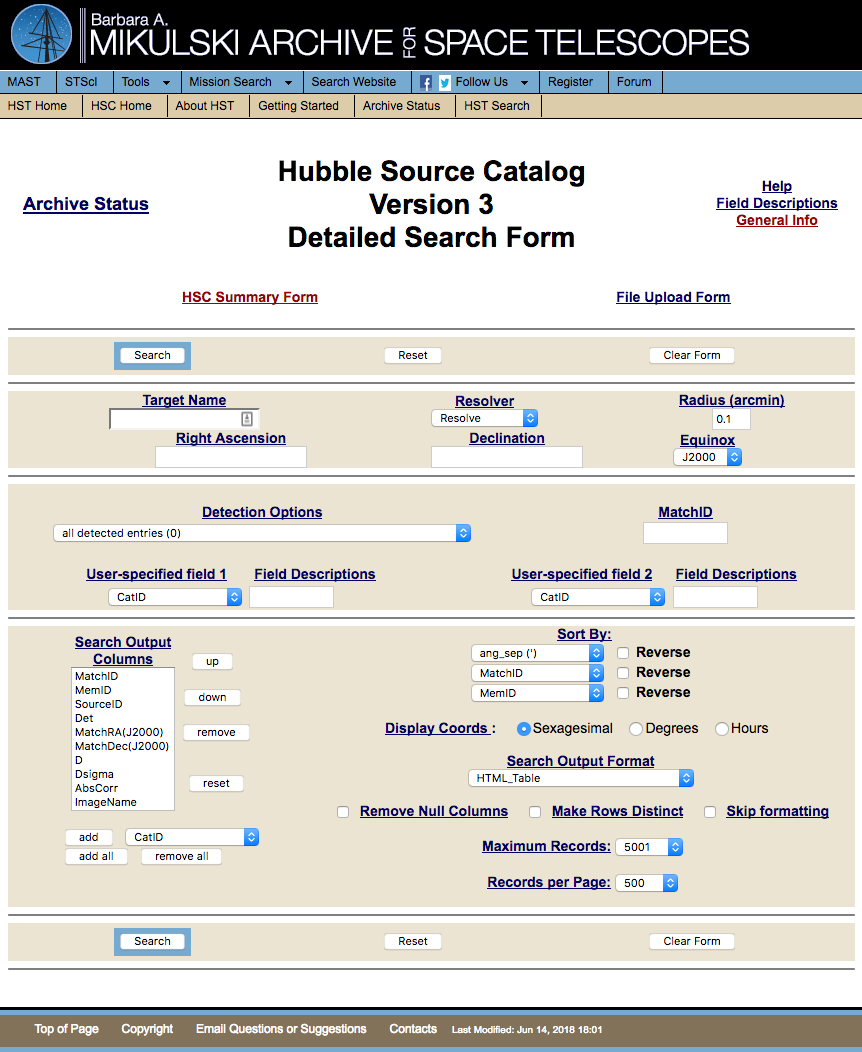
Here is a portion of some output from the HSC Detailed Form showing the matches for MatchID 91123656. Each source detection (i.e., SourceID) and nondetection (Det = N) has some separation distance, D, from the match position. The Dsigma value is the standard deviation of the D values, and is also reported in the HSC Summary Search Form.

...

Many of the detections in the Detailed Search Form are in matches that involve a single visit and detector. These cases have D=0 and Dsigma=0.
What is the HSC Summary Search Form? What are some of the primary columns?
The HSC Summary Search Form includes results for all detections for a given match on a single row. The magnitudes for different visits are averaged together, along with a variety of other information.
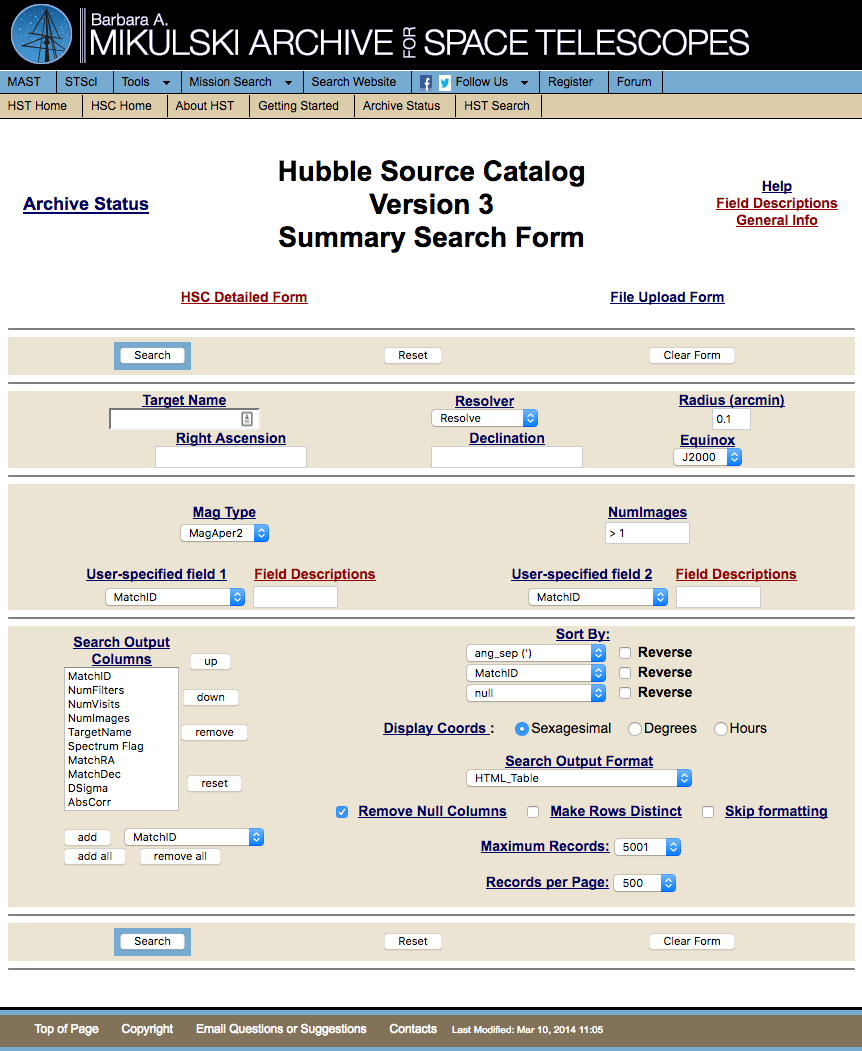
Example Output - Left portion:
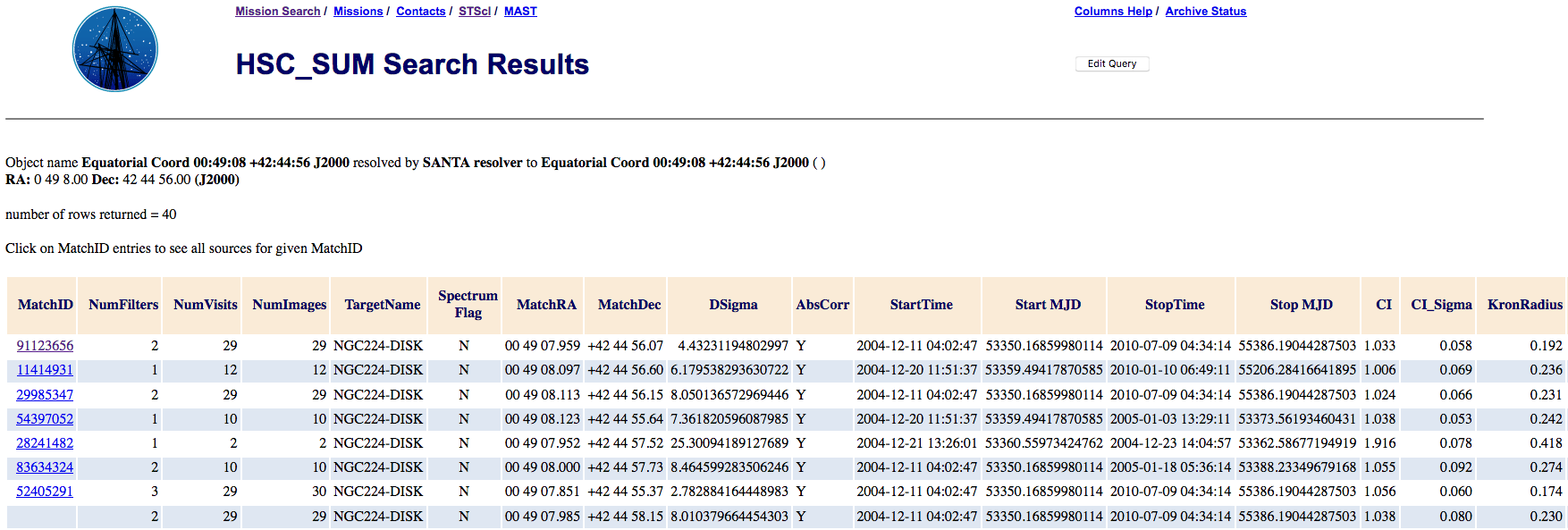
Example Output - Right portion:

More information about the individual detections that went into a given match can be obtained by searching the Detailed Search Form for the appropriate MatchID value by clicking on the blue MatchID value in the first column of the Summary Search Form. The detailed results for the first object are shown in the previous question.
For a short description of each column, click on "Field Descriptions" in the upper right of the HSC Summary Search Form. Slightly more detailed descriptions for some of the key columns (not already discussed for the Detailed Search Form above) are included below. For even more detailed information the HLA FAQ - About Source Lists is available.
NumImages = Number of separate images in a match. Often used to filter out artifacts (e.g., NumImages > 1 will remove most cosmic rays).
Spectrum Flag = Is there a matching COS, FOS, or GHRS spectral observation associated with this source? See "What are the columns in the spectral results page?" for details.
AbsCorr = Was it possible to correct the absolute astrometry (Y/N) by matching with Gaia, Pan-STARRS, SDSS, or 2MASS.
Start and Stop MJD = Modified Julian Date (MJD) for the earliest and latest image in the match.
CI (Normalized Concentration Index) = Mean value of the "Normalized" Concentration Index, defined as the difference in aperture magnitudes using the small aperture (i.e., MagAper1) and large aperture (MagAper2). Note that CI was not normalized in version 1. CI can often be used to help separate stars from extended sources.
CI_Sigma = Standard Deviation in the CI values for this MatchID.
KronRadius = Kron Radius in arcsec from the Source Extractor algorithm. IMPORTANT NOTE: The minimum value (i.e., for point sources) is 3.5 pixels, which translates to 0.14 arcsec for WFC3/UVIS, 0.175 arcsec for ACS/WFC, 0.315 arcsec for WFC3/IR, and 0.35 arcsec for WFPC2. Watch for a pileup of measurements at these values that are due to this limit rather than reflecting a real peak.
KronRadius_Sigma = Standard Deviation in the CI values for this MatchID.
Extinction = E(B-V) from Schlegel (1998).
Instrument_Filter = Median magnitude for all detections in the match, grouped by instrument (A = ACS, W2 = WFPC2, W3 = WFC3) and filter combination. The order is from short to long wavelengths. The values are in the ABmag system. The default is to provide MagAper2 values (i.e.,aperture photometry using the large aperture - see CI description above), but you can also request MagAuto (using the Source Extractor algorithm) values if you are more interested in extended sources. Note that in version 2 this was the mean magnitude instead of the median magnitude. The median is less susceptible to outliers.
Instrument_Filter_MAD = Median Absolute Deviation (MAD) around median magnitude for this Instrument_Filter combination. Note that in version 2 this was the RMS instead of the MAD. The MAD is less susceptible to outliers.
Instrument_Filter_N = Number of measurements that went into the determination of mean magnitude for this Instrument_Filter combination.
Ang Sep(') = Angular Separation for this match from the position used to make the search.
In HSC version 3, the mean combined magnitudes used in HSCv2 have been replaced by medians, and the scatter in those magnitudes is estimated using the median absolute deviation (MAD). Tables will be made available via HSC CasJobs to provide the mean and RMS values for these measurements; however, for most purposes the medians are preferred because they are more robust against spurious values.
NOTE: The initial release of HSC version 3 does not have the spectral links. This section will be updated when the links are added. The documentation below refers to HSC version 2.1.
Spectra obtained by the ACS Grism, COS, FOS, and GHRS are currently examined for HSC matches; STIS matching will be included in a future release. All FOS and GHRS spectra have been checked for HSC matches, while the ACS and COS data obtained by February 2006 and September 2014, respectively, have been checked. We will continue to check new COS spectra as they become available, while the ACS data was generated by the ECF and is no longer being produced.
For HSC version 2.1, spectroscopic matches for COS, FOS, and GHRS observations have been added for Version 2 sources that do not have Version 1 counterparts. In general you will find the same matches in Version 2.1 as Version 2, but you will also find additional new matches for a small number of objects. An example can be seen by searching for MRK817 using the Discovery Portal (i.e., match ID = 12904924). This was not a spectroscopic match for Version 2 but now is for Version 2.1 .
Another resource that may be of interest is the HST Spectroscopic Legacy Archive (HSLA). At present, this only provides access to COS FUV data. The HSC spectroscopic cross matching and the HSLA will be more closely linked in the future.
For the ACS Grism data, the matching was done strictly by comparing the coordinates of the Grism spectra with the HSC positions. If an HSC object was found within 0.4 arcsec of the position of the spectrum, it was considered a match. Given that the ACS Grism spectra all had concurrent ACS imaging data obtained, the matching should be reliable in nearly all cases.
For the other spectrographs, manual matching of the spectral object with the HSC was performed. First, an automated matching was performed with a search radius of 3.0 arcsec. If no HSC object was detected for a spectrum it was assumed there was no corresponding HSC source. Note that this does not mean that there might not be an image, or a source not included in the HSC, as discussed in the "Current Limitations" section of the Hubble Source Catalog home page.
If there was an HSC object, then the imaging data was inspected visually to identify the object. The identification was based on both the coordinate match as well as a rough magnitude match. For the FOS and GHRS, the targets were all bright enough that there was typically only one valid match candidate. For crowded fields, and for COS which observed fainter targets, finding charts from the literature were used (when possible) to confirm the identifications.
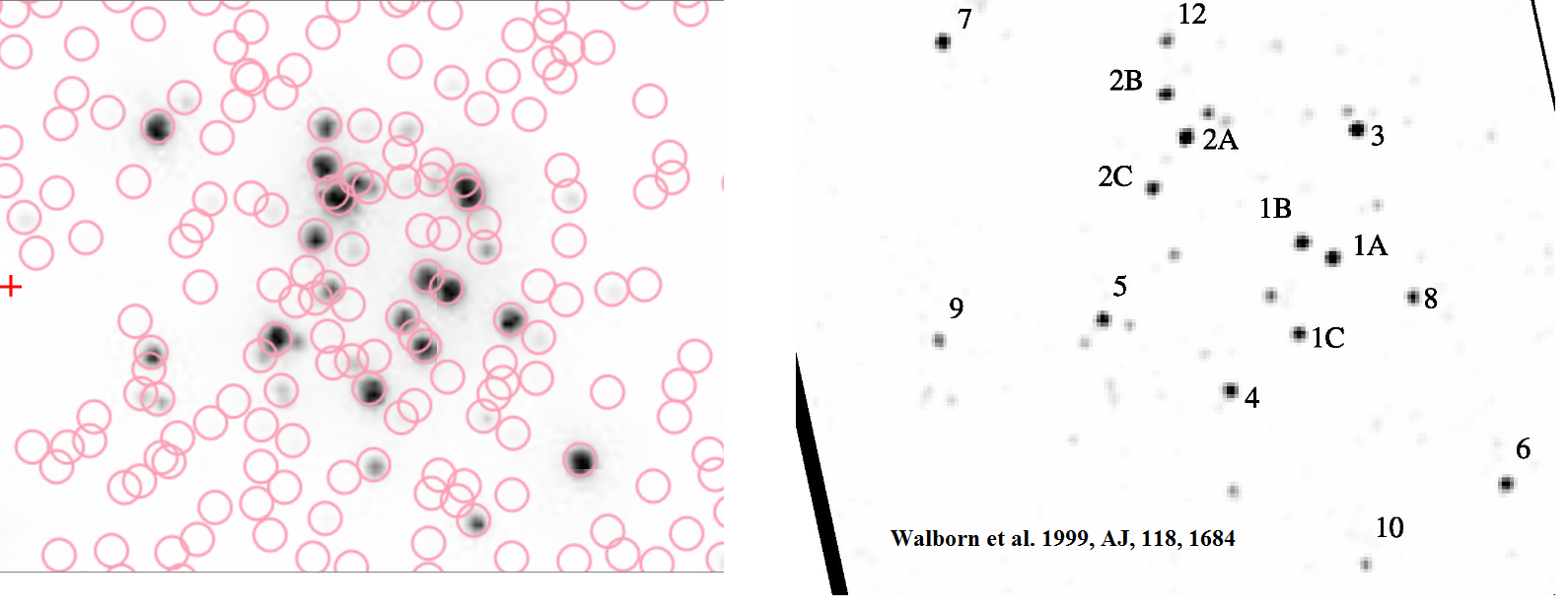 For example, this figure shows how
(Walborn et al. 1999)
was used to identify matches in 30 Dor.
For example, this figure shows how
(Walborn et al. 1999)
was used to identify matches in 30 Dor.
For some cases, either the finding chart was not sufficient, or there were no charts available, so no definite match could be made. These spectra are included in the spectral database with the HSC Match value being set to No. They are included to make users aware there is imaging data available, and that if a finding chart could be found it may be possible to match the spectrum with an HSC object.
For extended sources, it was sometimes not possible to determine exactly where the spectrum was obtained. If there was a clear knot/bright spot at the coordinates of the spectra, and that spot was identified as an HSC object, then a match was considered likely. However, all matches in extended objects should be considered as likely matches only.
How do you handle cases with multiple names or types?
Nominally, the object name included with the spectral data was obtained from the original proposer's target name. However, in some cases, the same target was observed by multiple proposers, and the object names were different in the proposals. For these cases, other sources (e.g. Simbad, literature) were used to select the "best" name.
Similarly, the object type included with the spectral data was generally obtained from the original proposer's classification in the Target Description field. However, in some cases, the same target was observed by multiple proposers, and the object types were different in the proposals. For these cases, other sources (e.g. Simbad, literature) were used to select a single type.
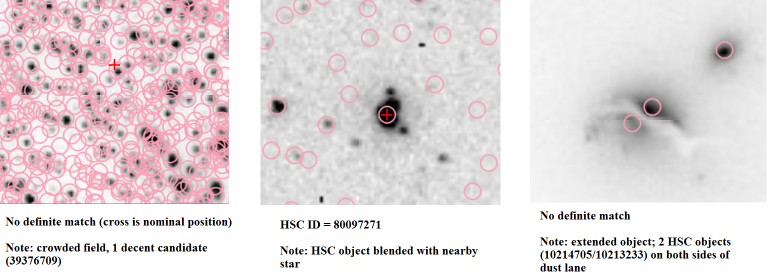 When doing the manual matching, sometimes there were issues with
the imaging data (e.g. crowded field, extended object) that
could impact the quality of the match between the HSC and the spectral data.
This information is included in the notes, as shown in these three examples.
When doing the manual matching, sometimes there were issues with
the imaging data (e.g. crowded field, extended object) that
could impact the quality of the match between the HSC and the spectral data.
This information is included in the notes, as shown in these three examples.
See HSC Use Case # 8 and 9 for more examples.
What are the columns in the spectral results page?
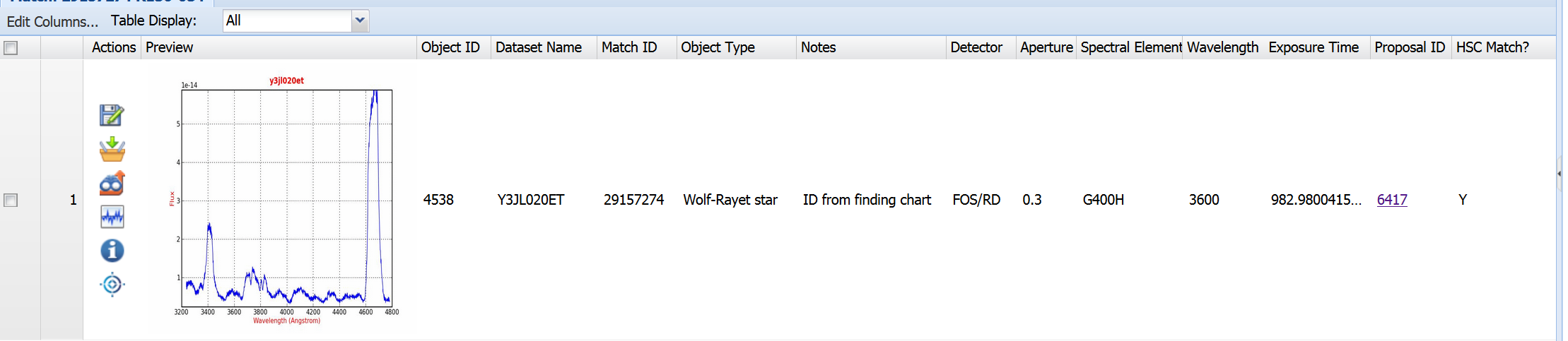 Here is an example of a match used in Use Case #8 (i.e., HSC MatchID=29157274)
The following columns are found in the spectral results page:
a) Preview - a preview image of the spectrum
b) Object ID - the ID number in the spectrum database
c) Dataset Name - the name of the dataset in the Archive
d) Match ID - the HSC Match ID number. See details about how the matching was done.
e) Object Type - the classification of the object. See details about how the classification was done.
f) Notes - when applicable, notes about the matching of the spectral observation with the HSC data (e.g. for crowded fields, the ID is based on a published finding chart and not just a coordinate match)
g) Detector, Aperture, Spectral Element, Wavelength, Exposure Time - the exposure parameters for the spectrum from the Archive
h) Proposal ID - the ID number of the proposal that generated the spectrum. Clicking on this will show you the abstract.
i) HSC Match? - if Yes, then there is an HSC match for the spectral. If No, then there was imaging data available, but no HSC match was identified (either because there was no object at the coordinates of the object or there were multiple candidates)
How do I find the HSC photometric data corresponding to an individual object?
If you click on the Load Detailed
 icon in the MAST Discovery Portal you will
get the HSC photometric summary page for the object. See HSC Use Case # 8 for an example.
icon in the MAST Discovery Portal you will
get the HSC photometric summary page for the object. See HSC Use Case # 8 for an example.
How can I use the MAST Discovery Portal to access the HSC?
The MAST (Milkulski Archive for Space Telescopes) Discovery Portal was designed to provide "one-stop" web access to the MAST missions (e.g., HST, Kepler, GALEX, FUSE, IUE, EUVE, Swift, XMM, ...), and the even broader world of the Virtual Observatory (VO). Here is a general description of the Discovery Portal and here is the Portal User Guide. With the Version 1 release, the Discovery Portal also becomes the primary way to access the HSC. The tools include:
-- Searching and filtering the HSC database.
-- Viewing the HSC or filtered subsets overplotted on images (e.g, DSS, Pan-STARRS, GALEX, SDSS, and HST).
Access to the HLA Interactive Display is also available.
-- Viewing the HSC in a table format. Creating new
columns and plotting one column vs. another.
-- Cross matching with a wide range of surveys
including GALEX, SDSS, 2MASS, as well as tables
available from CDS (Strasbourg Astronomical
Database).
-- Uploading or downloading tables data from/to
local files.
-- And as of HSC version 2, showing spectroscopic data from the ACS Grisms, COS, FOS and GHRS cross matched with the HSC.
See the FAQ - About Spectroscopic Cross Matching for details.
How can I cross match objects between Version 2 and Version 3?
There may be circumstances when a researcher has a list of objects they were working on from HSC version 2 but would now like to identify their counterparts in Version 3. This can be done using a table called xMatchV2 which is available via HSC CasJobs.
NOTE: The initial release of HSC version 3 does not have the xMatchV2 table. This section will be updated when the cross-match table is added. The documentation below refers to HSC version 2.1.
After logging into HSC CasJobs (see HSC Use Case #2 if you are not familiar with CasJobs), click on MyDB and then set the context to HSCv3. Under Tables you will find the file xMatchV2. Click on that to see the help file. Try running the example as a query.
Here is a short script showing how to do a match for a specific region of the sky around M83:
select s3.MatchRA, s3.MatchDec, x.MatchID, x.MatchID1,
	d=dbo.fDistanceArcMinEq(s2.MatchRA, s2.MatchDec, s3.MatchRA, s3.MatchDec)*60.0*1000, Rank
from xmatchv2 x join hscv2.SumPropMagAper2Cat s2 on x.MatchID2=s2.MatchID
                join SumPropMagAper2Cat s3 on x.MatchID=s3.MatchID
where s2.MatchRA > 204.252 and s2.MatchRA < 204.256
      and s2.MatchDEC > -29.867 and s2.MatchDEC < -29.863
      and x.Rank < 2 and x.DistArcSec < 0.1
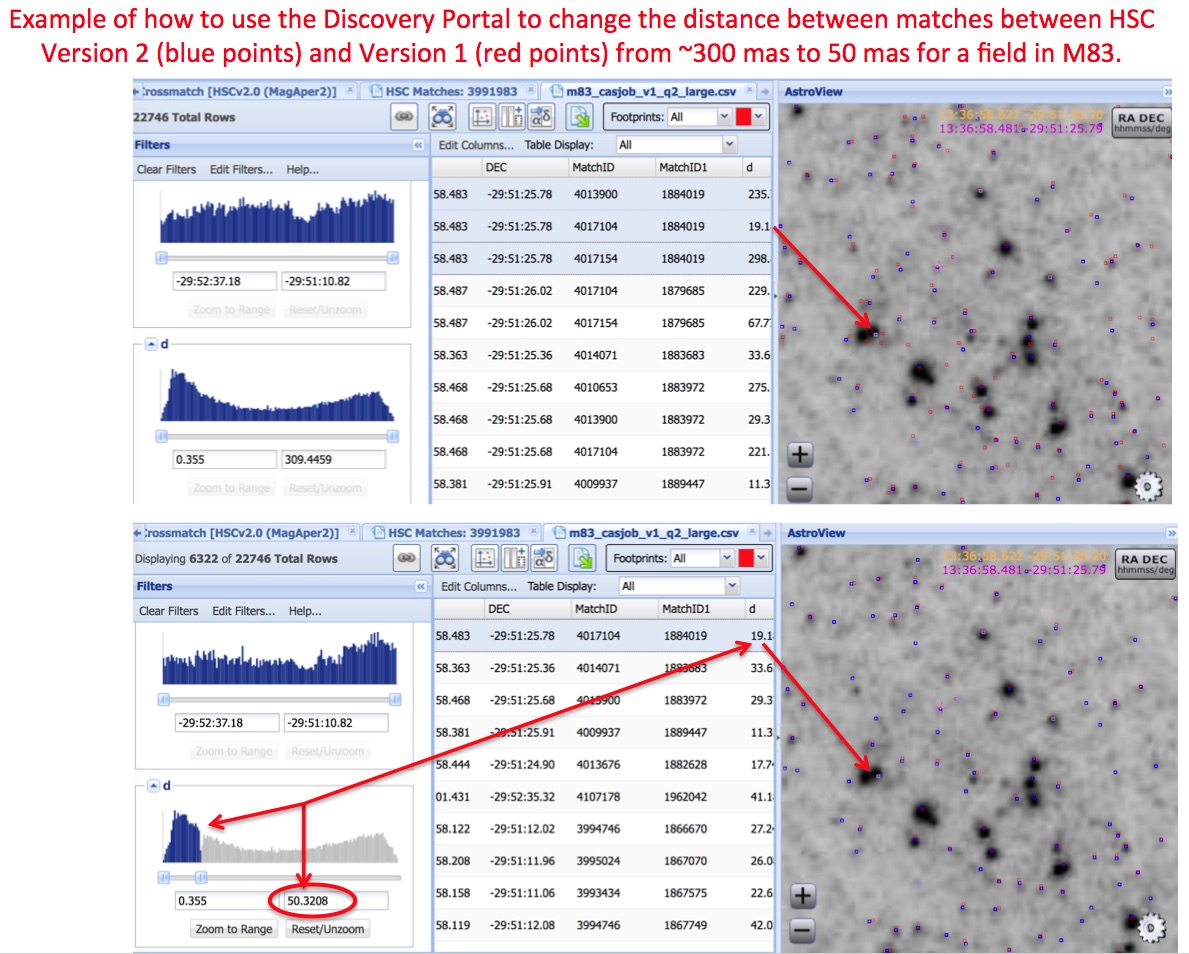 Note that this script assumes:
These two parameters (and others such as the RA and DEC of course) can be modified in the script if different values are wanted.
The output can be saved as a file and then read into the Discovery Portal to examine the quality of the cross matching. Modifications (e.g., a different upper limit in D) can also be made in the Discovery Portal (see the graphic on the right for an example) and then saved in a file, or the user can go back to the HSC CasJobs query and make modifications there if they prefer.
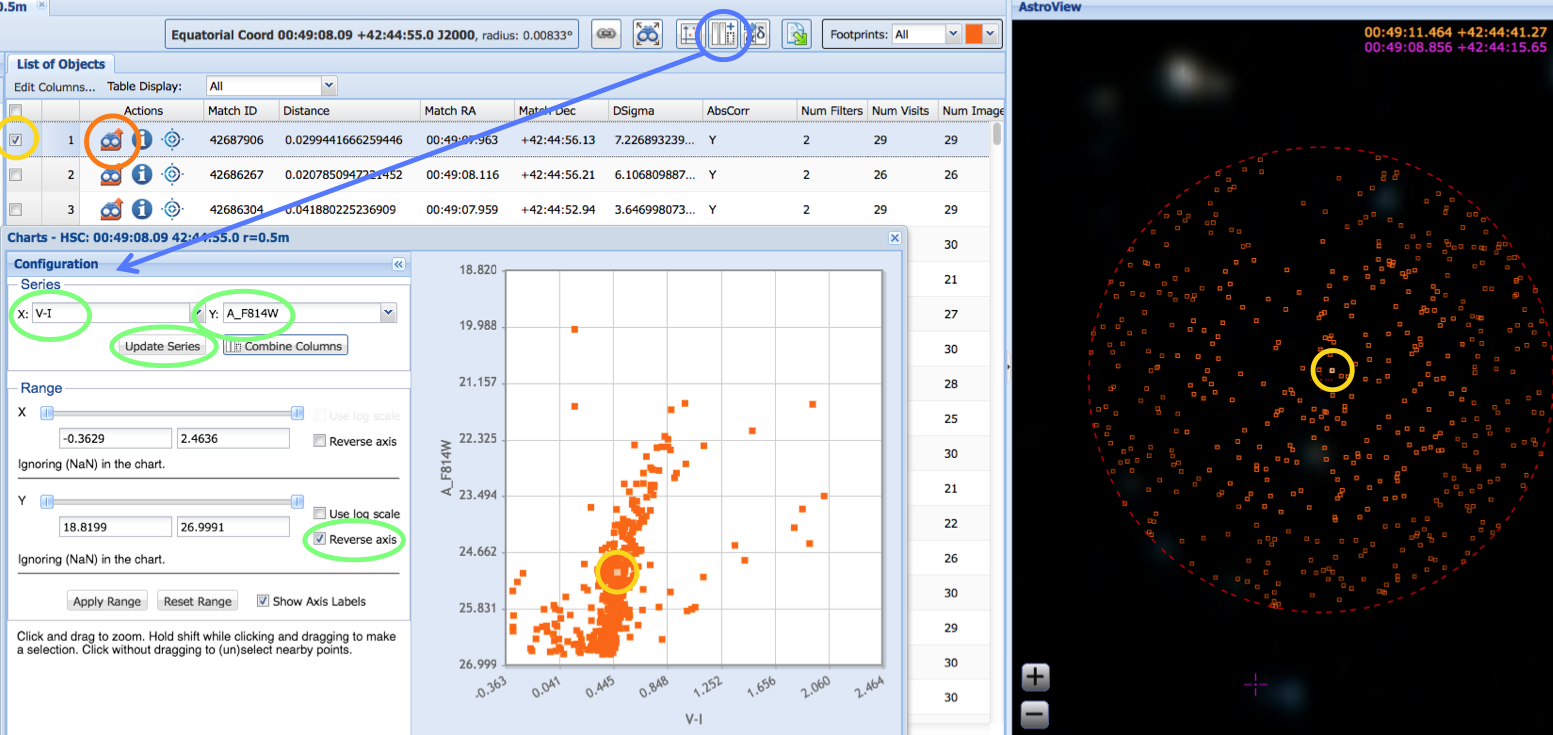
Here we show an example (from HSC
Use Case # 1
of using the Discovery
Portal to make a color-magnitude diagram, highlighting a specific object
(yellow)
and showing its location in the image, its values in the table, and its position in the plot.
NOTE: Both HSC versions 2 and 3 are available using the cross-match capabilities and the "Select a collection" box of the Discovery Portal.
FAQs specific to the Discovery Portal
Question:
I looked at the HLA Interactive Display and saw that there were 100,000
objects in the HSC for a specifc image. Why does the Discovery Portal (DP)
query only return 50,000?
Answer:
50,000 is the maximum number of records currently
supported for query results in the Discovery Portal. Larger queries can be handled in the HSC CasJobs tool.
Question:
Can I import my own catalog of objects into the DP?
Answer: Yes, using the "Upload Target List" button just below the "Select a collection" box (i.e., the
 icon).
Question:
How can get get the MagAuto magnitudes instead of MagAper2 in the DP?
Answer:
The Discovery Portal can now access both
aperture magnitudes (i.e., MagAper2) and estimates of total
magnitudes (i.e., using the MagAuto algorithm in Source
Extractor). Select the magnitude you want using the popup menu underneath the
Collection menu that was used to select HSCv3.
Question:
Where is the plot
 icon you mention in the use case? I don't see it on the screen.
Answer: Depending on the size of the box with the target
position (entering a target position generally makes the
box big while entering a target name does not), the
AstroView window can COVER UP the icon. By grabbing the
side of the AstroView window and dragging to the right,
you can shrink the window and reveal the row of icons.
 Question:
Can I overlay the HSC on HST images?
Question:
Can I overlay the HSC on HST images?
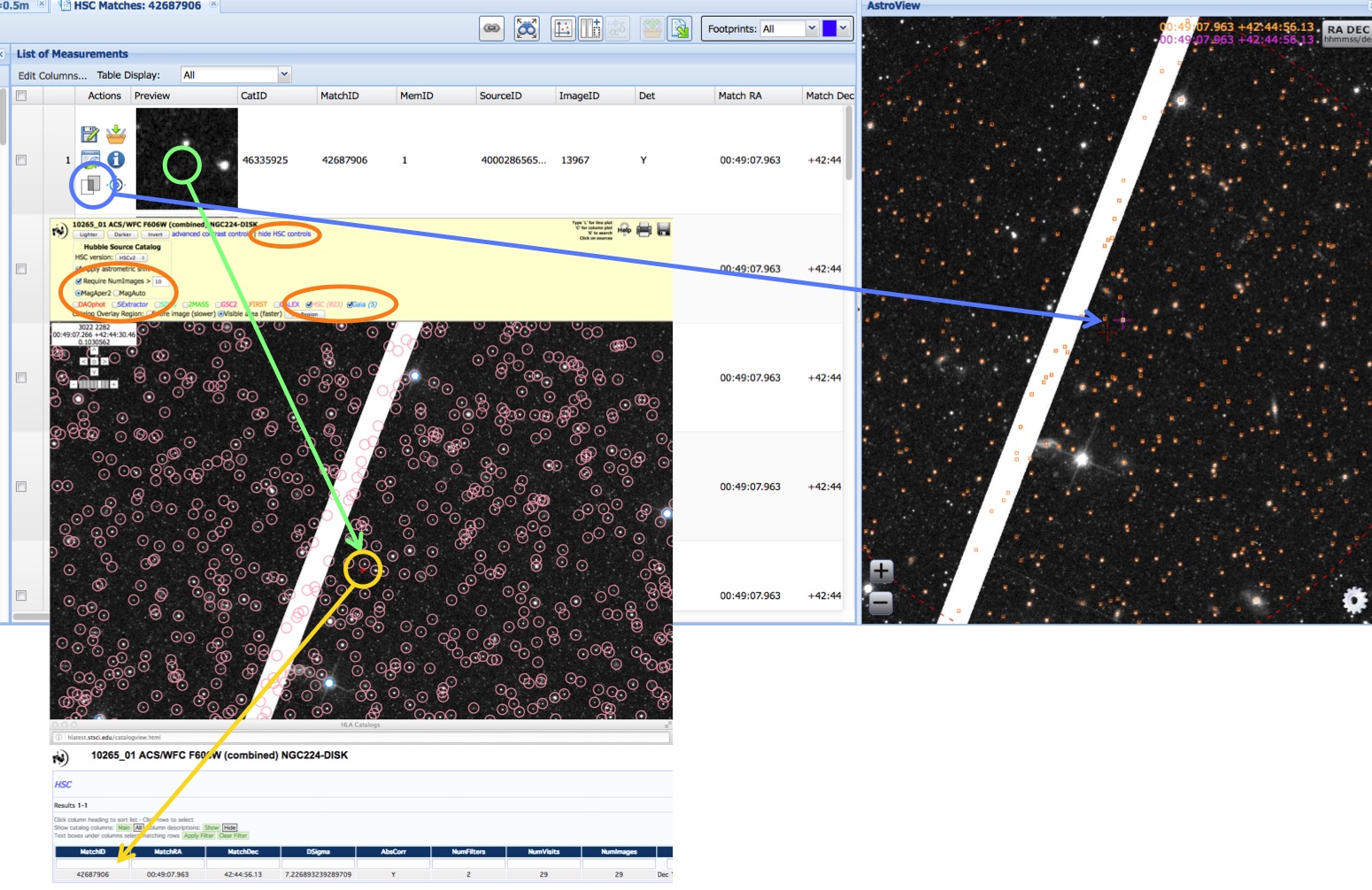
Answer: Yes. After doing your query, click on the
 icon under
Actions (Load Detailed Results)
. This will show you the
details for a particular MatchID, including cutouts for all the HST
images that went into this match. If you then click on the
icon under
Actions (Load Detailed Results)
. This will show you the
details for a particular MatchID, including cutouts for all the HST
images that went into this match. If you then click on the  icon under Action (Toggle Overlay Image) (blue circle in the image
- see Use Case # 1), the HST
image will be displayed over the DSS image in AstroView
icon under Action (Toggle Overlay Image) (blue circle in the image
- see Use Case # 1), the HST
image will be displayed over the DSS image in AstroView
Question:
Can I bring up the HLA interactive viewer from the DP?
Answer: Yes. After doing your query, click on the first
icon under
Actions (Load Detailed Results). This will show you the
details for a particular MatchID, including cutouts for all the HST images that went into this match. If you click on the
cutout (green circle in the image - see Use Case # 1)
, the HLA interactive viewer will come up.
Question:
Can I change the contrast control in the AstroView window?
Answer: Not at this time. The HLA Interactive Display, discussed above, can be used for this.
Question:
Can I center the field on a selected target?
Answer: Yes, click on the bulls-eye
 icon for the target of interest.
How can I use CasJobs to access the HSC?
The primary purpose of the HSC Catalog Archive Server Jobs System (CasJobs) is to permit large queries, phrased in the Structured Query Language (SQL), to be run in a batch queue. CasJobs was originally developed by the Johns Hopkins University/Sloan Digital Sky Survey (JHU/SDSS) team. With their permission, MAST has used version 3.5.16 of CasJobs to construct three CasJobs-based tools for GALEX, Kepler, and the HSC
 While HSC CasJobs does not
have the limitations of only including a
small subsample of the HSC (i.e., 50,000 objects), as is the
case for the MAST Discovery Portal, it
also does not have the wide variety of
graphic tools available in the Discovery
Portal. Hence the two systems are
complementary.
While HSC CasJobs does not
have the limitations of only including a
small subsample of the HSC (i.e., 50,000 objects), as is the
case for the MAST Discovery Portal, it
also does not have the wide variety of
graphic tools available in the Discovery
Portal. Hence the two systems are
complementary.
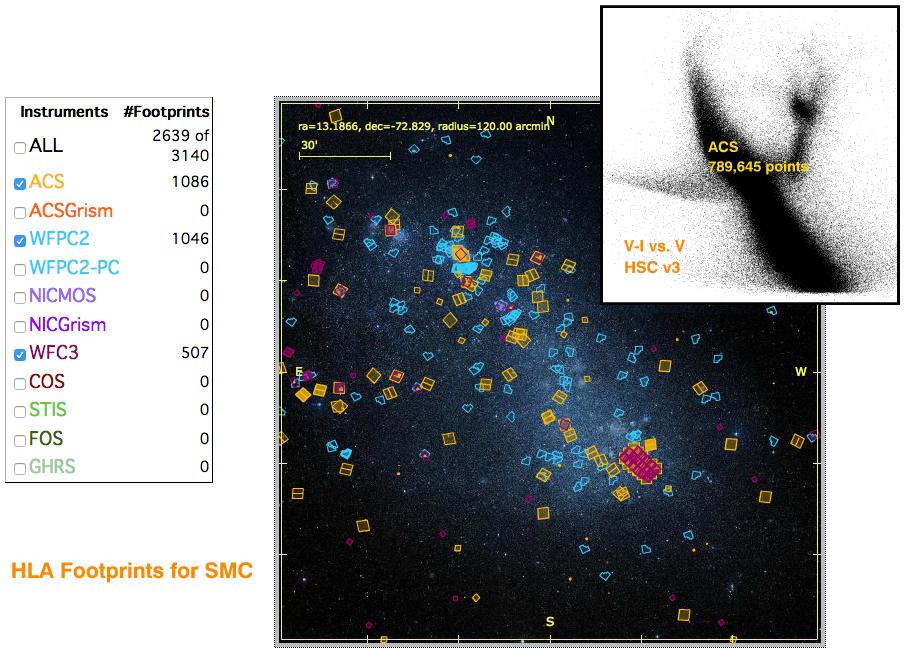
This figure (from HSC Use Case # 2) provides a demonstration of the speed and power of the HSC CasJobs interface. Starting from scratch, imagine how long it would take to construct a color-magnitude diagram for all Hubble observations of the Small Magellanic Cloud (SMC). A search of the HLA shows 7,289 observations in this region, 1366 of them with ACS. With HSC CasJobs, a color-magnitude can be made for ACS data in less than two minutes.
Casjobs also provides a personal database (i.e. myDB) facility where you can store output from your queries and save stored procedures and functions. This powerful aspect of Casjobs can also be used as a group sharing facility with your collaborators.
Question:
Why does my query give me an error saying that the function
I was using (e.g. SearchSumCatalog) is an invalid object
name?
Answer:
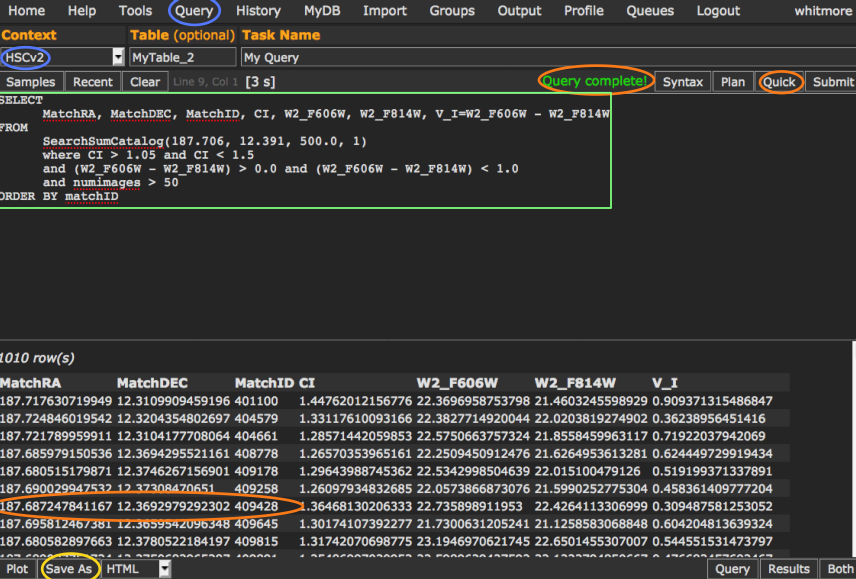
This error usually indicates that the context is set
incorrectly. Check that the context says HSCv3 and not MyDB. This
is probably the MOST FREQUENT PROBLEM people have with HSC CasJobs.
(See the blue oval under Context in the image, and see use case # 2 for more details.)
 Question:
I created an output catalog a while ago, and when I go to the
Output tab it is no longer there. What happened to it?
Question:
I created an output catalog a while ago, and when I go to the
Output tab it is no longer there. What happened to it?
Answer: There is a lifetime for output of 1 week. Tables in your MyDB database do not
get deleted though, so you can recreate the output.
Question:
When I tried to plot my table, I got an error message saying that
the input string was not in a correct format. What is wrong?
Answer:
If there are any entries that have non-numeric
values (such as NaN indicating no data), the plotting tool cannot
handle them. The solution is to restrict your queries to only real
numbers by adding a condition such as: A_F606W > 0 which will only
include sources with measured values.
Question:
What does 'Query results exceed memory limitations' mean?
Answer: This means the result of the query which you've submitted
is greater than the memory buffer will allow. This message only
applies to 'quick' queries; queries using 'submit' do not have
any memory restrictions. The easiest thing to do is just use
submit instead of quick.
Question:
How do I see all the searches I have done?
Answer: The History page will show all the queries you have
done, as well as summary information (submit date, returned
rows, status). If you click on Info, you can see the exact
query that executed, and resubmit the job if you like.
Question:
How do I see all the results I have generated?
Answer:
The MyDB page shows you all the tables you have generated.
Clicking on the table name will show you the details of the table.
Question:
How do I see all the available HSC tables, functions, and procedures?
Answer: Click on the MyDB at
the top of the page, and then set the context to HSC. Clicking on
the Views (currently empty), Tables, Functions, and Procedures will
list the available material.
Clicking on specific tables or functions will provide more information.
(NOTE: When looking at functions, the default is to show the
source code. To see the description instead, click on "Notes" near the
top of the page.)
Question:
Where are some example queries to run?
Answer: Several of the HSC Use
Cases have examples
(e.g., Use Cases #2 and #5). Another good place to look is by
clicking the Samples button after you hit the Query button (e.g.,
provides examples of cross matching and making histograms). There are
also pointers to SDSS training materials on the left of the HSC
HELP page.
Question:
Where can I find the schema information for various HSC tables,
functions and procedures (i.e., similar to the SDSS SkyServer
Schema Browser)?
Answer: To get the schema for different HSC tables, function and procedures,
first go to the top of the page and click on
MyDB to bring up the database page.
Next go to the drop down menu in the upper left
and select HSC as the "context". Now click on one of
the tables to see its schema information. To view schema for
views, functions and procedures, click on the appropriate link
below the context menu.
How can I use Python to access the HSC?
The MAST CasJobs server has a programmatic interface that can be used to run SQL queries from scripting languages including Python. We have created the mastcasjobs Python module to make this relatively simple. See the Python Jupyter notebook created to access the SWEEPS data in HSC v3.1 for working examples of how to run these queries.
Note that you will still need to write SQL queries to use this interface via Python. But the ability to script queries in order to run many similar queries using variable parameters can make certain projects far easier.
How can I use the HSC Home Page and Search Forms?
The HSC Summary and Detailed Search Forms, accessible from the HSC Home Page, provided the original access tool (e.g., for the Beta releases). While they are still useful for certain kinds of searches, they have been largely superseded by the Discovery Portal and HSC CasJobs tools. The CasJobs tool can be used to issue the same queries used by the HSC Search Forms, as well as many other possible queries, but it requires SQL code.
There are two forms-based interfaces to the catalog that follow the
conventions of MAST. These are the
Summary Search Form, which allows users
to obtain mean magnitudes and other information with one row per
match; and the Detailed Search Form, that provides information about each
individual detections in a match.
Here are some examples of when it might be appropriate to use the HSC Search Forms rather than either the Discovery Portal or the HSC CasJobs.
-- Adding, deleting, or rearranging some of the columns on the HSC Summary Form. This is possible using the Output Columns on the HSC Summary Search Form.
-- Looking for non-detections. It is sometimes useful to have information about when an object is NOT found on an image. This is possible by changing the Detection Options on the HSC Detailed Form. See this question for a discussion of level 0, 1, and 2 detections.
-- Changing the format of the output from the HSC Summary or Detailed Search Forms. The HSC Search Forms have a wider variety of format options than the Discovery Portal or CasJobs. Examples are providing output coordinates in Sexagesimal, Degrees, or Hours; 17 different output formats including html, VOtables, delimited output (using comma, tab, space, pipe, or semicolon as the separator), JSON, IRAF space-separated with-INDEFS, and Excel spreadsheet format.
FAQs specific to the HSC Home Page and Search Forms
Question:
Where can I find definitions of the columns in the HSC Summary or Detailed Search Forms?
Answer:
For a short description of each column, click on "Field Descriptions" in the upper
right of the Search Form.
Slightly more detailed descriptions for some of the key columns are
discussed above.
For even more detailed
information see the
HLA Source List FAQ.
Question:
Can a list of targets be used for a HSC search?
Answer:
Yes - A list of targets can be searched using the "File Upload
Form" link, which is located near the top right of either the HSC
Summary or Detailed Search forms. The "Local File Name" box (or "Browse"
pull-down menu) allows you to provide the name of a file listing the
targets you would like to include in the search. A number of different
format options for the input file are allowed, as defined in the target
field definition portion of the form.
What are specific limitations and artifacts that HSC users should be aware of?
NOTE: Unless otherwise noted, the graphics in this section are taken from version 1.
The Hubble Source Catalog is composed of visit-based, general-purpose source lists from the Hubble Legacy Archive (hla.stsci.edu) . While the catalog may be sufficient to accomplish the science goals for many projects, in other cases astronomers may need to make their own catalogs to achieve the optimal performance that is possible with the data (e.g., to go deeper). In addition, the Hubble observations are inherently different than large-field surveys such as SDSS, due to the pointed, small field-of-view nature of the observations, and the wide range of instruments, filters, and detectors. Here are some of the primary limitations that users should keep in mind when using the HSC .
LIMITATIONS:
Uniformity: Coverage can be very non-uniform (unlike surveys like SDSS), since a wide range of HST instruments, filters, and exposure times have been combined. We recommend that users pan out to see the full HSC field when using the Interactive Display in order to have a better feel for the uniformity of a particular dataset. Adjusting the value of NumImages used for the search can improve the uniformity in many cases. See image below for an example.
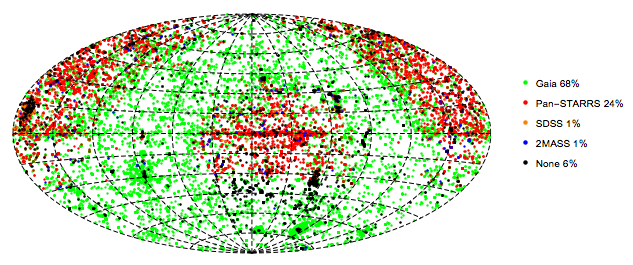
Astrometric Uniformity: In version 3, about 94% of HSC images have coverage in Gaia, 2MASS, Pan-STARRS or SDSS or that permits absolute astrometric corrections of the images (i.e., AbsCorr = Y). For Gaia-calibrated images, the absolute astrometric median error is about 10 mas for images near the Gaia DR1 reference epoch (2015.0). The error increases due to proper motions by about 5 mas/yr at earlier (and later) epochs. The errors when using the other reference catalogs (only when there are too few Gaia reference stars) are larger, up to 0.1 arcsec. See Whitmore et al. (2016) for more details about astrometry and to see the corresponding map for version 1. In version 3 we always prefer Gaia when possible, and fall back on 2MASS, Pan-STARRS, and SDSS (in that order) for fields where there are fewer than 4 matches to Gaia stars.
The figure shows the sky map for regions where different reference catalogs were used. About 2/3 of the images were calibrated using Gaia, with most of the remaining images using Pan-STARRS (at high Galactic latitudes in the northern sky). 6% of the images, mainly south of declination -30 degrees, have no astrometric reference calibration.
Depth: The HSC does not go as deep as it is possible to go. This is due to a number of different reasons, ranging from using an early version of the WFPC2 catalogs (see "Five things you should know about the HSC" ), to the use of visit-based source lists rather than a deep mosaic image where a large number of images have been added together.
Completeness: The current generation of HLA WFPC2 Source Extractor source lists have problems finding sources in regions with high background. The ACS and WFC3 source lists are much better in this regard. The next generation of WFPC2 source lists will use the improved ACS and WFC3 algorithms, and will be incorporated into the HSC in the future.
Visit-based Source Lists: The use of visit-based, rather than deeper mosaic-based source lists, introduces a number of limitations. In particular, much fainter completeness limits, as discussed in Use Case # 1. Another important limitation imposed by this approach is that different source lists are created for each visit, hence a single, unique source list is not used. A more efficient method would be to build a single, very deep mosaic with all existing HST observations, and obtain a source list from this image. Measurements at each of these positions would then be made for all of the separate observations (i.e., "forced photometry"). This approach will be incorporated into the HSC in the future.
ARTIFACTS:
False Detections: Uncorrected cosmic rays are a common cause of blank sources. Such artifacts can be removed by requiring that the detection be based on more than one image. This constraint can be enforced by requiring NumImages > 1.
Another common cause of "false detections" is the attempt by the detection software to find large, diffuse sources. In some cases this is due to the algorithm being too aggressive when looking for these objects and finding noise. In other cases the objects are real, but not obvious unless observed with the right contrast stretch and field-of-view. It is not easy to filter out these potential artifacts without loosing real objects. One technique users might try is to use a size criteria (e.g., concentration index = CI) to distinguish real vs. false sources.
Yet another source of false detections is artifacts around bright stars due to bleeding, diffraction spikes, and other PSF features.
Doubling:
There are occasionally
cases where not all the detections of the same
source are matched together into a single
objects. In these cases, more than one match
ID is assigned to the object, and two pink
circles are generally seen at the highest
magnification in the display, as shown by the
yellow arrows in the example. Most of
these are very faint objects, and the primary
reason there are more in version 2 compared to
version 1 is the deeper ACS source lists.
These "double objects" generally have very different numbers of images associated with the two circles. Hence, this problem can often be handled by using the appropriate value of NumImages to filter out one of the two circles. For example, using Numimages > 9 for this field removes essentially all of the doubling artifacts, at the expense of loosing the faintest 25 % of the objects (see figure on right)
Mismatched Sources: The HSC matching algorithm uses a friends-of-friends algorithm, together with a Bayesian method to break up long chains (see Budavari & Lubow 2012) to match detections from different images. In some cases the algorithm has been too aggressive and two very close, but physically separate objects, have been matched together. This is rare, however.
Bad Images:
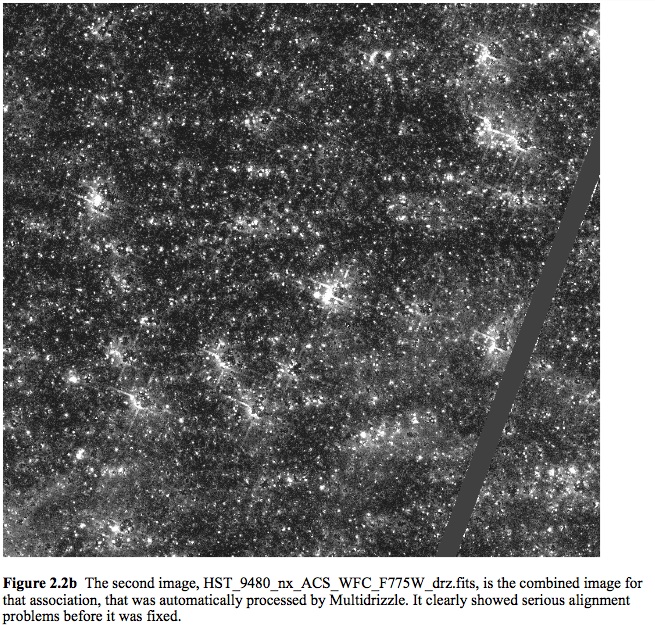 Images taken
when Hubble has lost lock on guide stars (generally after an
earth occultation) are the primary cause of bad images. We
attempt to remove these images from the HLA, but
occasionally a bad image is missed and a corresponding bad
source list is generated. A document showing these and other examples of
potential bad images can be found at the HLA Images FAQ.
If you come across what you believe
is a bad image please inform us at archive@stsci.edu.
Images taken
when Hubble has lost lock on guide stars (generally after an
earth occultation) are the primary cause of bad images. We
attempt to remove these images from the HLA, but
occasionally a bad image is missed and a corresponding bad
source list is generated. A document showing these and other examples of
potential bad images can be found at the HLA Images FAQ.
If you come across what you believe
is a bad image please inform us at archive@stsci.edu.
Is there a summary of known image anomalies?
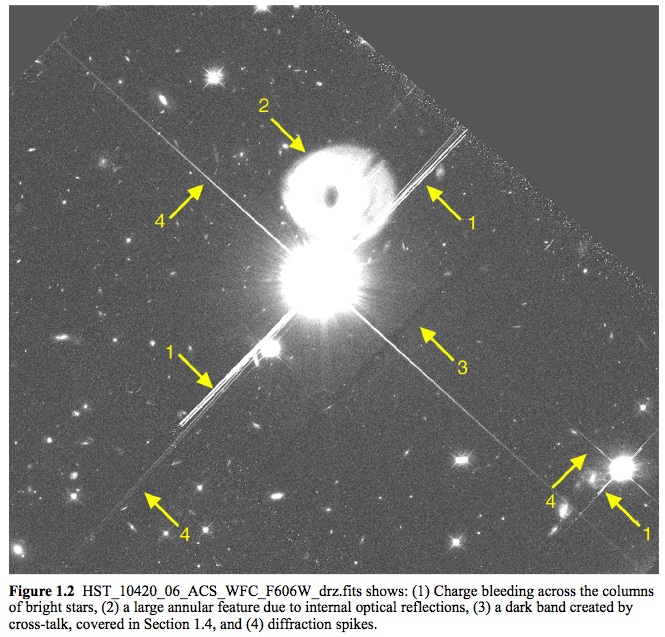 Yes — see the HLA Images FAQ.
Here is a figure from the document showing a variety of artifacts associated with very bright objects.
Yes — see the HLA Images FAQ.
Here is a figure from the document showing a variety of artifacts associated with very bright objects.
How good is the photometry for the HSC?
NOTE: This section is based largely on studies performed for the Whitmore et al. (2016) paper using version 1 of the HSC. Comparisons with version 3 show that systematics are similar while the noise has improved compared with version 1. See the next question for information on the comparison of HSC versions 2 and 3.
Due to the diversity of the Hubble data, this is a hard question to answer. We have taken a three-pronged approach to address it.
We first examine a few specific datasets, comparing magnitudes directly for repeat measurements. The second approach is to compare repeat measurements in the full database. While this provides a better representation of the entire dataset, it can also be misleading since the tails of the distributions are generally caused by a small number of bad images and bad source lists. The third approach is to produce a few well-known astronomical figures (e.g., color-magnitude diagram for the outer disk of M31 from Brown et al 2009) based on HSC data, and compare them with the original study.
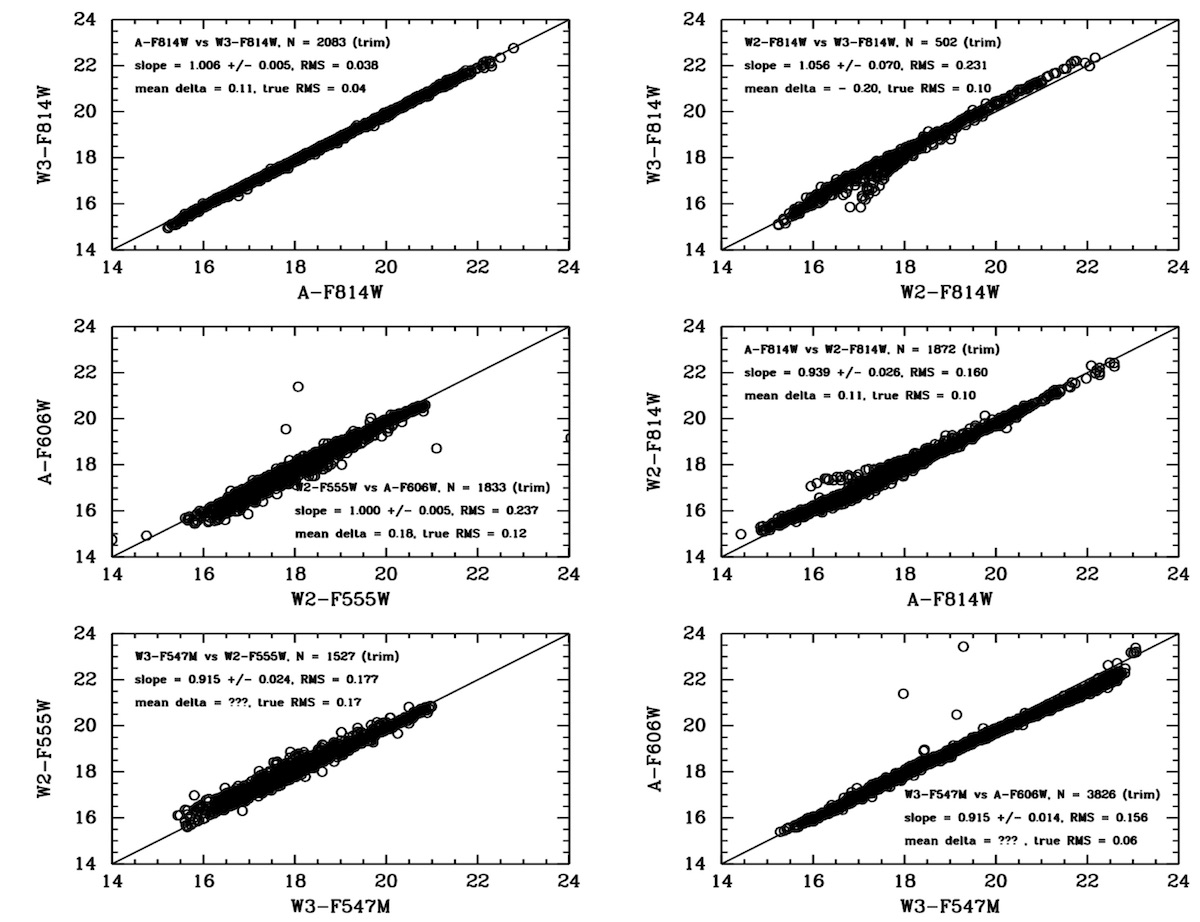 For our first case we examine the repeat measurements in the globular
cluster M4. For this study, as well as the next two, we use MagAper2 values (i.e., aperture magnitudes),
which are the default
for the HSC. In the last
example (extended galaxies) we use MagAuto values.
For our first case we examine the repeat measurements in the globular
cluster M4. For this study, as well as the next two, we use MagAper2 values (i.e., aperture magnitudes),
which are the default
for the HSC. In the last
example (extended galaxies) we use MagAuto values.
The figure shows that in general there is a good one-to-one agreement for repeat measurements using different instruments with similar filters. Starting with the best case, A-F814W vs W3-F814W shows excellent results, with a slope near unity, values of RMS around 0.04 magnitudes, and essentially no outliers. However, an examination of the W2-F814W vs. W3-F814W and A-F814W vs W2-F814W comparisons show that there is an issue with a small fraction of the WFPC2 data. The short curved lines deviating from the 1-to-1 relation show evidence of the inclusion of a relatively small number of slightly saturated star measurements (i.e., roughly 5 % of the data).
We now turn to our second approach; looking at repeat measurements for the entire HSC database. The following figures shows the distribution of comparisons between independent photometric measurements of pairs of sources that belong to the same match and have the same filter in the HSC for version 2 (right) and version 3 (left). The x-axis is the flux difference ratio defined as abs(flux1-flux2)/max(flux1,flux2). The y-axis is the number of sources per bin (whose size is a flux difference ratio of 0.0025) that is normalized to unity at a flux difference of zero.
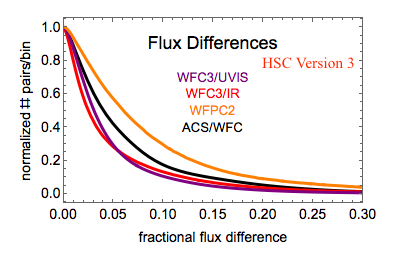
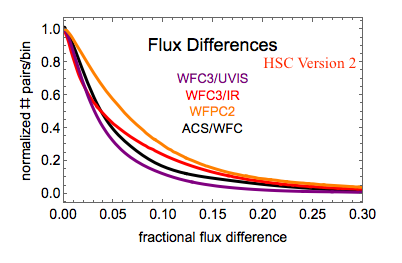
The main point of this figure is to demonstrate that typical photometric uncertainties in the HSC are better than 0.10 magnitude for a majority of the data. We also note that the curves are similar in versions 2 and 3, but the noise has decreased significantly in version 3 due to improvements in the HLA source list photometry. These plots include all sources regardless of magnitude and signal-to-noise, so the differences are dominated by faint sources near the detection limits of the images.
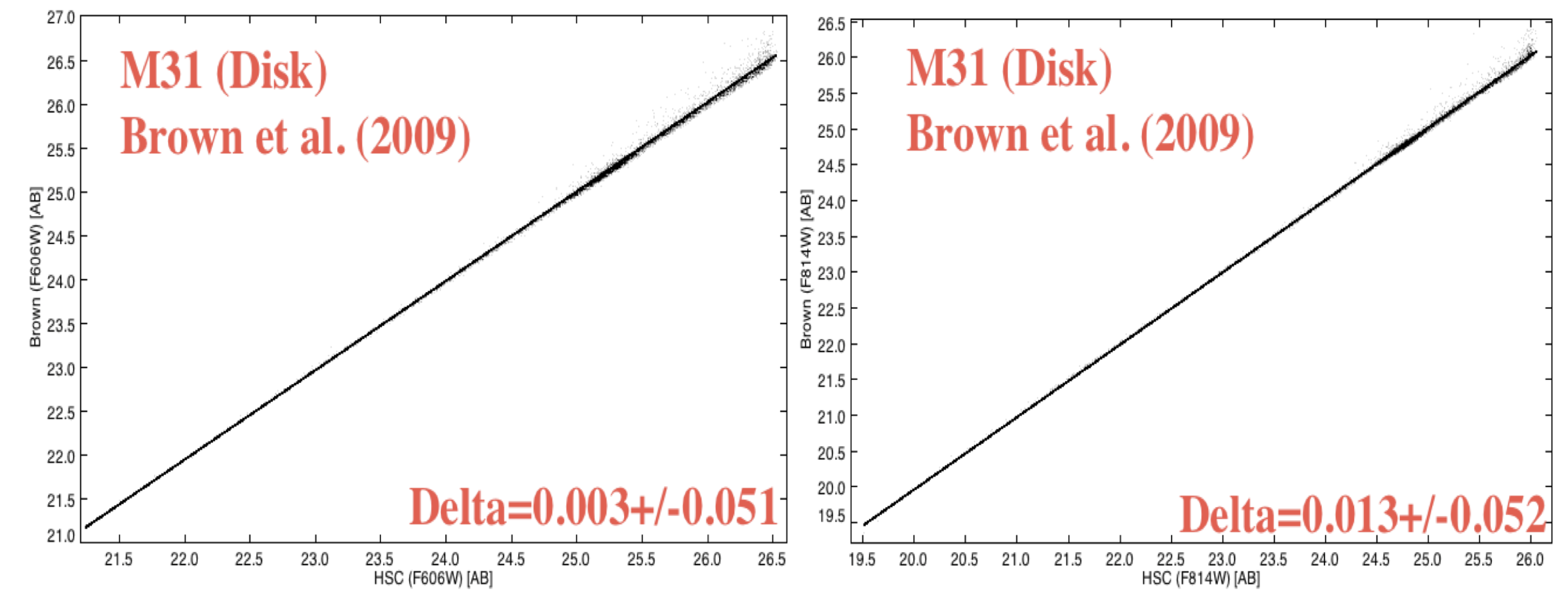
Next we compare HSC data with other studies. The case shown below is a comparison between the HSC and the Brown et al. (2009) deep ACS/WFC observations of the outer disk of M31 (proposal = 10265). The observing plan for this proposal resulted in 60 separate one-orbit visits (not typical of most HST observations), hence provide an excellent opportunity for determining the internal uncertainties by examining repeat measurements. In the range of overlap, the agreement is quite good, with zeropoint differences less than 0.02 magnitudes (after corrections from ABMAG to STMAG and from aperture to total magnitudes) and mean values of the scatter around 0.05 mag. However, the Brown study goes roughly 3 magnitudes deeper, since they work with an image made by combining all 60 visits. More details are available in HSC Use Case #1, and in Whitmore et al. (2016).
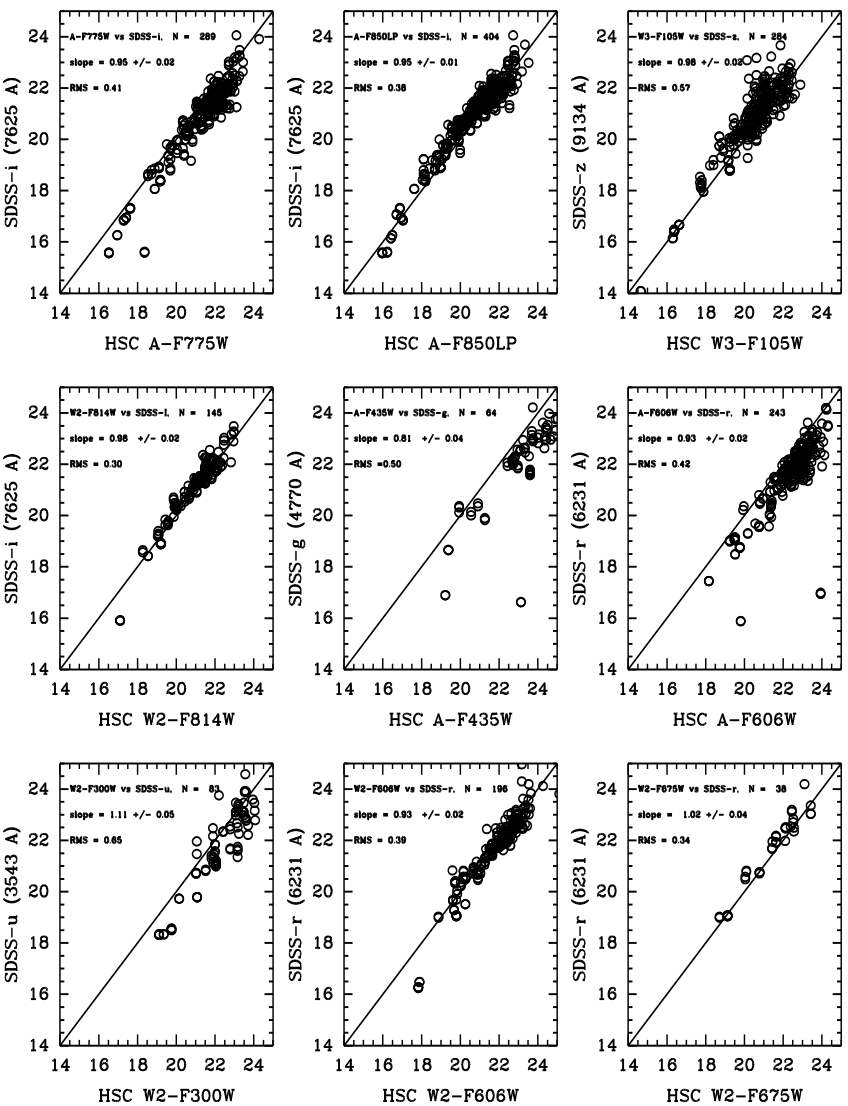
For our final photometric quality example we compare the HSC with ground-based observations from the Sloan Digital Sky Survey (SDSS) observations of galaxies in the Hubble Deep Field. Using MagAuto (extended object photometry) values in this case rather than MagAper2 (aperture magnitudes), we find generally good agreement with SDSS measurements. The scatter is typically a few tenths of a magnitude; the offsets are roughly the same and reflect the differences in photometric systems, since no transformations have been made for these comparisons. The best comparison is between A_F814W and SDSS-i. This reflects the fact that these two photometric systems are very similar, hence the transformation is nearly 1-to-1 .
How does the HSC version 3 photometry compare with version 2?
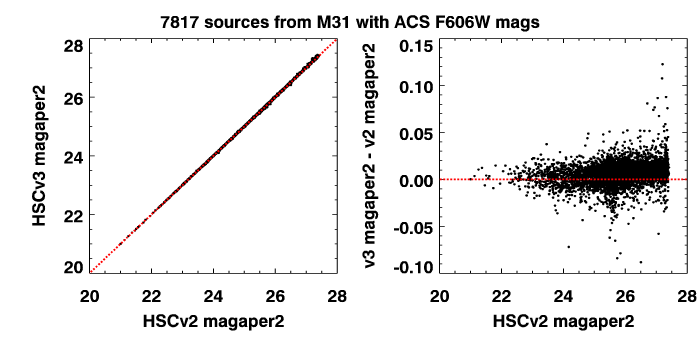 In this figure we compare photometry
from version 3 and version 2 in
a field in M31. This figure was made by requiring
measurements from the same set of images in
both versions, so that we are comparing "apples with apples". The objects are required to
have magnitude uncertainties less than 0.07 mag in both versions of the catalog (to eliminate
the faintest and noisiest measurements).
We find that the agreement is very
good, with an rms difference less than 0.01 magnitude. The offset between
version 3 and version 2 photometry in this field is 0.006 magnitude.
Similar comparisons in other fields (e.g., in M87 where most
of the point-like sources are actually resolved
globular clusters) show similar results.
In this figure we compare photometry
from version 3 and version 2 in
a field in M31. This figure was made by requiring
measurements from the same set of images in
both versions, so that we are comparing "apples with apples". The objects are required to
have magnitude uncertainties less than 0.07 mag in both versions of the catalog (to eliminate
the faintest and noisiest measurements).
We find that the agreement is very
good, with an rms difference less than 0.01 magnitude. The offset between
version 3 and version 2 photometry in this field is 0.006 magnitude.
Similar comparisons in other fields (e.g., in M87 where most
of the point-like sources are actually resolved
globular clusters) show similar results.
The catalog photometric noise level from the median absolute deviation (MAD) column is similar in the two catalogs for this field, although there is a population of sources near the image edges that has much smaller MAD values (by as much as 0.1 mag or more). That is the result of improvements and bug fixes for the sky matching algorithm and the Source Extractor background computation that significantly improved the photometry and the incidence of spurious detections near the edges of images. Overall in this field the photometric quality is similar to or better than the version 2 photometry depending on the position in the image.
In many fields, the source list photometric quality is significantly improved in version 3 compared with version 2. These larger improvements are the result of an improved alignment algorithm used to match exposures and filters in the HLA image processing. The figure below compares the photometric noise for HSCv2 and HSCv3 in globular cluster M4, where the alignment of exposures leads to greatly reduced noise in the new catalog. The noise was determined from the scatter among the HSC magnitudes from typically more than 100 measurements of each matched object.
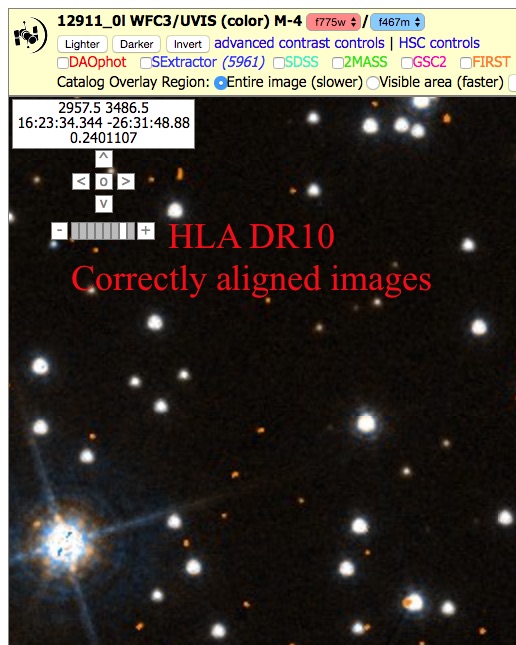
The figure below shows one of the images in M4 that had alignment errors that degraded the photometry (right panel). The newer images (left panel) are correctly aligned, which results in reduced noise shown above.
 |
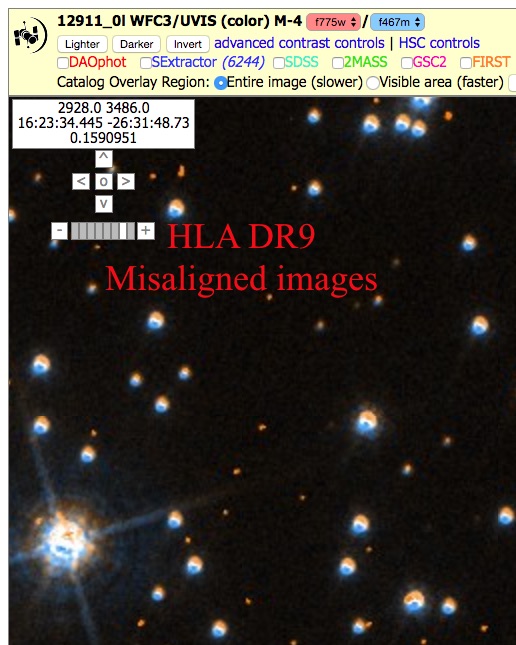 |
| Comparison of HLA DR10 images used for HSCv3 with the DR9 image used for HLAv2. The old images had a misalignment between filters that led to degraded photometry (right panel). The misalignment is easily seen in the color image on the right. The new alignment algorithm corrects this error (left panel), which leads to much better photometry. | |
What is the "Normalized" Concentration Index and how is it calculated?
In version 1, one of the items in the List of "Known Problems" was that raw values of the Concentration Index (the difference in magnitude for aperture photometry using magaper1 and magaper2) were added together to provide a single mean value in the summary form. The reason this is a problem is that each instrument/filter combination has a different normalization. For example, the Peak of Concentration Index for Stars and Aperture Correction Table shows the raw values of the concentration index for stars is 1.08 for the ACS_WFC_F606W filter, 0.88 for WFC3_UVIS_F606W and 0.86 for WFPC2_F606W. Similarly, the raw values of the concentration index vary as a function of wavelength for some detector. For example, WFC3_F110W has a peak value of 0.56 while WFC3_160W has a value of 0.67.
Hence, averaging the mean values of the Concentration Index together in Version 1 resulted in values that were not always very useful, and were often misleading.
Starting with version 2 we have corrected this by normalizing (dividing by) the value of the peak of the raw concentration index for stars using observations from each instrument and filter, as provided in the table listed above. The values are then averaged together to provide an estimate of the "Normalized" Concentration Index, which is listed as the value of CI in the summary table.
With this change, objects with values of CI ~ 1.0 are likely to be stars while sources with much larger values of CI are likely to be extended sources, such as galaxies. There are cases where this is still not true (e.g., saturated stars, cosmic rays, misaligned exposures within a visit, ...), hence caution is still required when using values of CI.
The CI values are noticeably improved in HSC version 3 because of the improved filter and exposure alignment implemented in the pipeline for the HLA DR10 images. Previously misaligned exposures would lead to centering errors and degraded PSFs in the combined images. The figure below shows that the images are consistently sharper, with the CI distribution concentrated more tightly around unity. See the M4 sample image shown above for a particularly dramatic example of the improvement.
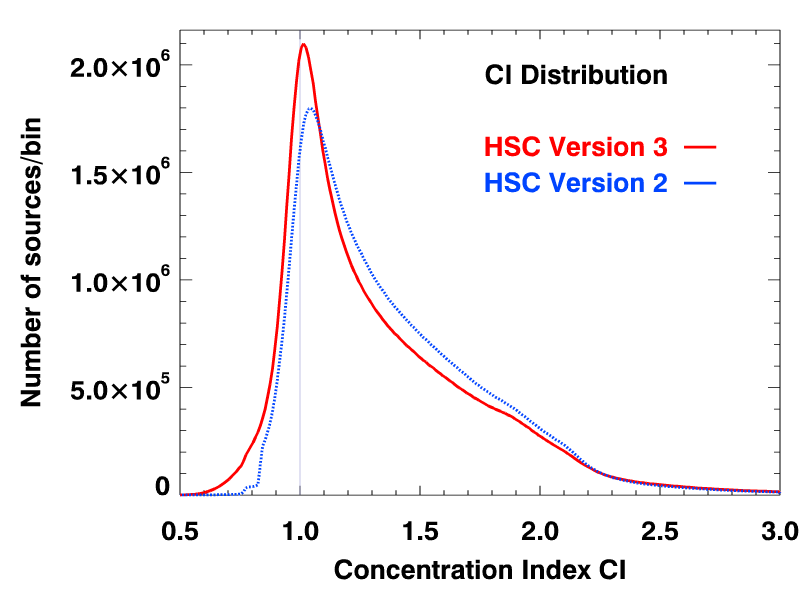 |
| Comparison of the concentration index distributions for HSCv3 and HSCv2. The y-axis shows the counts in bins of size 0.01. For HSCv2, the distribution has been normalized to have the same integral as in HSCv3. The HSCv3 distribution is narrower and more tightly distributed around unity, which is the CI value for point sources. The improvement is due to better alignment algorithms in the HLA DR10 image processing. |
How good is the astrometry for the HSC?
This plot from version 3 shows (in blue) the distribution of the relative astrometric
errors in the HSC corrected astrometry, as measured by the positional
offsets of the sources contributing to multi-visit matches from their
match positions. The
units for the x-axis are milli-arcsec (mas). The y-axis is the number
of sources per bin that is 0.1 mas in width. Plotted in orange is the corresponding
distributions of astrometric errors based on the original HST image
astrometry.
This measures the repeatability of astrometric measurements in the HSC. Note that it includes all sources of noise (including all sources down to the detection limit) and also includes the effects of proper motions. The peak (mode) of the HSC corrected astrometric error distribution in HSC version 3 is 3.0 mas, while the median offset is 7.6 mas. The original, uncorrected (i.e., current HST) astrometry has corresponding values of 9.3 mas and 68 mas, respectively.
The following two figures show the corrected astrometric offset distributions for the different instruments for multi-visit matches in the HSC for version 2 and version 3. The distribution tail for offsets larger than 10 mas are substantially improved in version 3. Also note the large increase in the number of sources for ACS/WFC, WFC3/UVIS and WFC3/IR due to the addtion of new data.
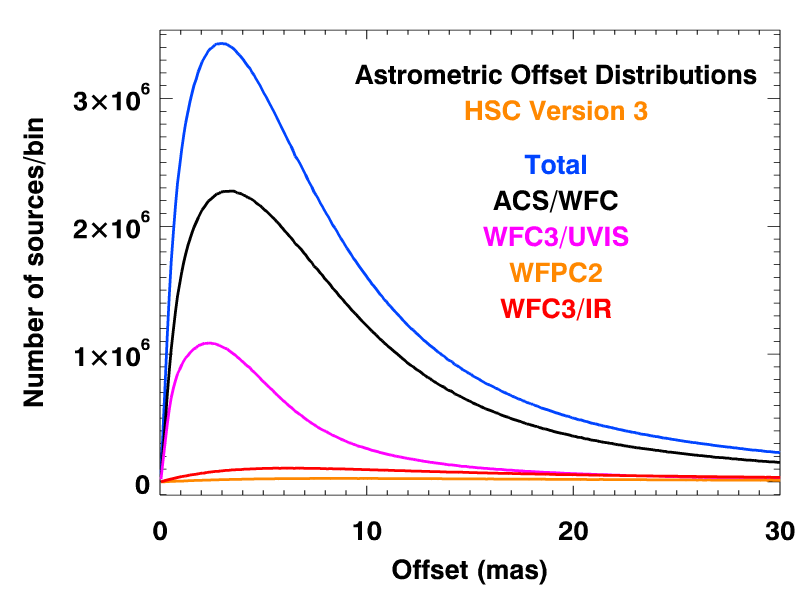
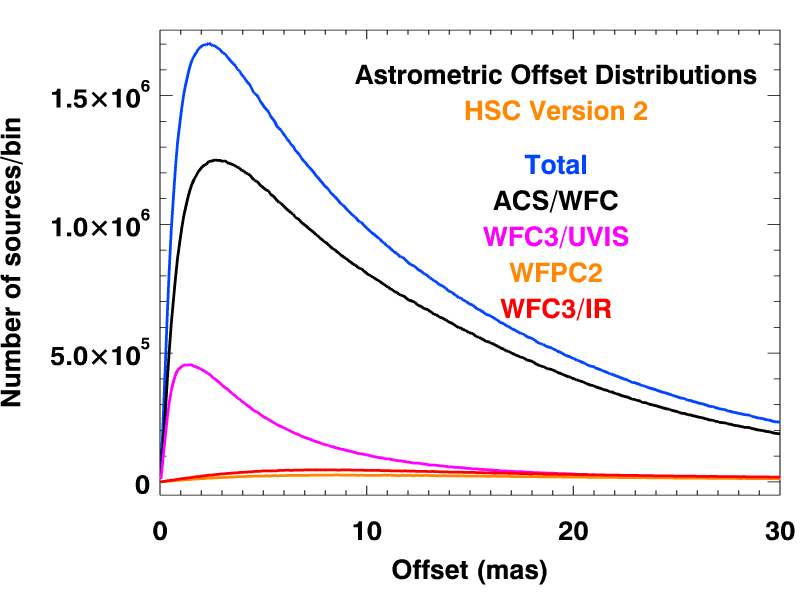
As expected, the instruments with smaller pixels — ACS (50 mas) and WFC3/UVIS (40 mas) — show the best astrometric accuracy, with a peak less than a few mas and typical values less than 10 mas. On the other hand, the instruments with larger pixels — WFPC2 (100 mas on the WFC chips that dominate the statistics) and WFC3/IR (130 mas) — have much larger astrometric uncertainties, with less than 10 mas peaks and typical values that are less than 20 mas. The table below gives the peak (mode) and median offsets for the various instruments.
| Detector | Peak (mas) | Median (mas) |
|---|---|---|
| ACS/WFC | 3.4 | 7.8 |
| WFC3/UVIS | 2.4 | 5.0 |
| WFC3/IR | 6.2 | 19.0 |
| WFPC2 | 8.0 | 25.4 |
| Total | 3.0 | 7.6 |
Several astrometric studies are currently being analyzed and will be added to this FAQ in the future.
How does the HSC compare with Gaia astrometry?
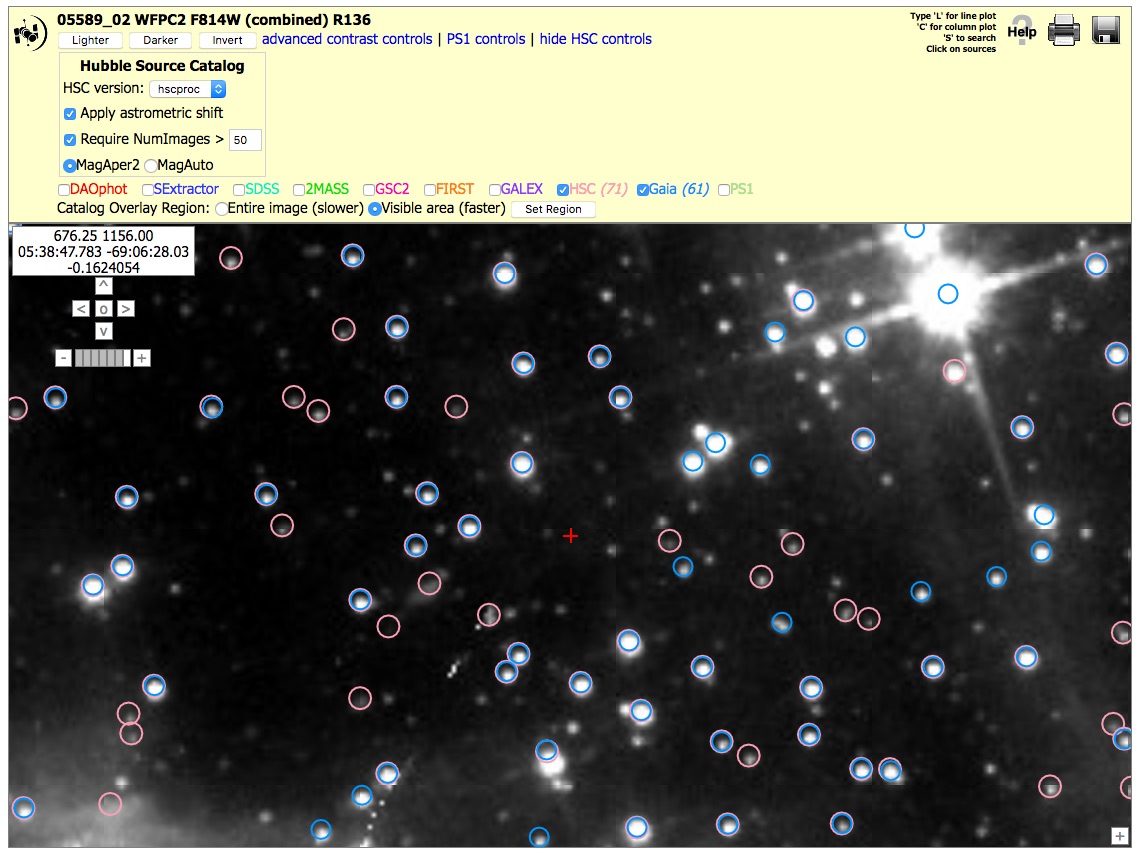
This figure shows a small portion in the outskirts of 30 Dor. There are 61 Gaia sources (blue) in this region and 71 HSC sources (pink) with NumImages > 50. There would be 1215 HSC sources if we used a NumImages > 5 criteria to reach fainter sources. This figure shows good agreement in the positions of HSC relative to Gaia for this field. Since Gaia DR1 was used for astrometric calibration whenever possible, we are confident that HSC version 3 has well calibrated positions. Note that since we did not have access to Gaia DR2 when processing HSCv3, streaming motions in the Gaia catalog will still lead to astrometric offsets for fields that are far from the Gaia DR1 reference epoch (2015.0).
Does the HSC include proper motions?
Most objects in HSC v3 do not have proper motions in the database, but it is possible to compute proper motions if the time coverage is sufficient. For HSC v3.1, we have recalibrated the astrometry for the SWEEPS field using Gaia DR2 and have computed proper motions for more than 400,000 faint stars down to magnitude 27. See the additional HSC v3.1 documentation for more information.
What are the future plans for the HSC?
Are there training videos available for the HSC?
There were previously two videos available, but because they rely on the Flash plugin (which has been retired), they no longer work.
There is a Hubble Hangout that features the HSC.
Are there Use Cases available for the HSC?
Yes. We have a variety of Use Cases. Most of these currently use HSC version 2, but they are being updated to HSC version 3. The two catalog versions are similar enough that the older use cases are still good examples of how to use the data.
SWEEPS Python Jupyter notebook - Using HSC v3.1 astrometry tables to study the proper motions of 400,000 stars in the SWEEPS field
HSC Use Case #1 - Using the Discovery Portal to Query the HSC - (Stellar Photometry in M31 - Brown et al. 2009)
HSC Use Case #2 - Using CasJobs to Query the HSC - (Globular Clusters in M87 and a Color Magnitude Diagram for the SMC)
HSC Use Case #3 - Using the Discovery Portal to search for Variable Objects in the HSC - (Time Variability in the dwarf irregular galaxy IC 1613)
HSC Use Case #4 - Using the Discovery Portal to perform cross-matching between an input catalog and the HSC - (Search for the Supernova 2005cs progenitor in the galaxy M51)
NOTE: This use case was made using version 1. However, most of the changes are relatively minor, hence it is still quite useful.
HSC Use Case #5 - Using the Discovery Portal and CasJobs to search for Outlier Objects in the HSC - (White dwarfs in the Globular Cluster M4)
HSC Use Case #6 - Using the Discovery Portal to study the Red Sequence in a Galaxy Cluster - (The Red Sequence in the Galaxy Cluster Abell 2390)
NOTE: This use case was made using version 1. However, most of the changes are relatively minor, hence it is still quite useful.
HSC Use Case #7 - Comparing HSC "Sloan" filter magnitudes and SDSS magnitudes - (using the field around GRB110328A)
NOTE: This use case was made using version 1. However, most of the changes are relatively minor, hence it is still quite useful.
HSC Use Case #8 - Combining HSC magnitudes and HST spectra to Investigate Objects in the HSC (using objects in the LMC Cluster R136)
HSC Use Case #9 - Searching for Objects with both HST Imaging and Spectroscopic Data
HSC Use Case #10 - Using the HSC to determine positions for a JWST NIRSpec Multi-Object Spectroscopic (MOS) observation
Archived Use Cases from Beta 0.2
NOTE: These archival use cases are outdated, but included here since they provide some detailed information that may be of interest to people. They do not make use of the Discovery Portal, or CasJobs interface, and they may contain features that are no longer included in the HSC interfaces (e.g., VOPLOT).
M31 - Point Source Photometry (Beta 0.2 version)
Galaxy IC 1613 - Time Variable Phenomena (Beta 0.2 version)
M87 - Photometry of Slightly Resolved Objects (Beta 0.2 version) (video tutorial)
Is there a facebook page available to share information (e.g., your own use cases) about the HSC?
 Yes. HSC Facebook Page
Some of the items posted have been:
February 26, 2015 - Comparing HSC and SDSS photometry of galaxies. This was eventually included in the Whitmore et al. (2016) article.
March 17, 2015 - Announcement of a Hubble Hangout featuring the HSC.
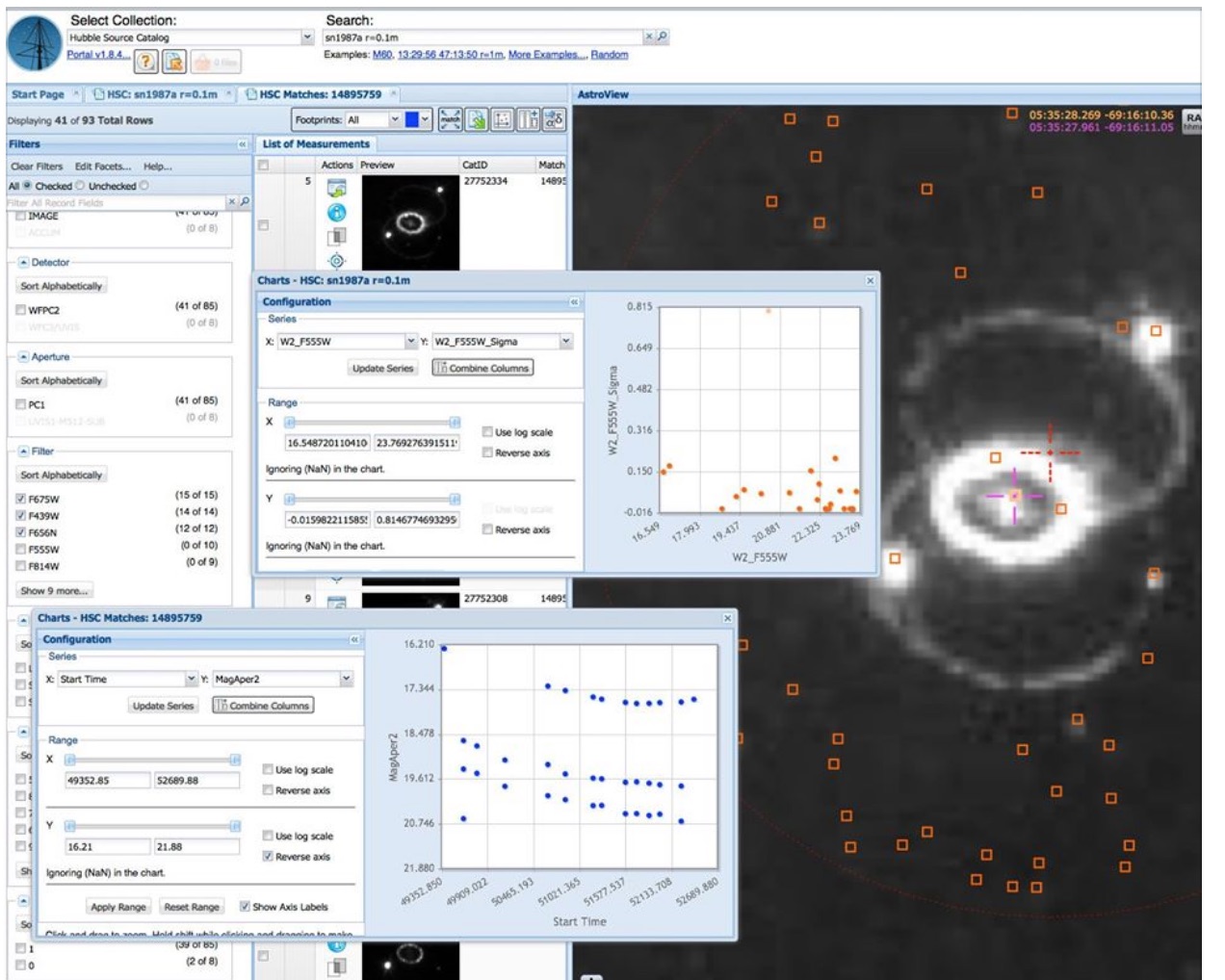
May 6, 2015 - Making a light curve for SN 1987A (see figure).
We plan to include more material following the version 2 release - (e.g., draft use cases, plans for a citizen science project to help characterize HLA images, development of educational modules based on the HLA and HSC, preparations for "Detecting the Unexpected" workshop to be held February 27 - March 2, 2017, potential science projects with the HSC, ...). Please consider joining us so we can develop this into a useful community resource.
Is there a journal-level article on the HSC available for reference?
Yes. Whitmore et al. (2016), titled "Version 1 of the Hubble Source Catalog"
There is an updated description of the Beta version of the HSC, and the matching algorithms used in Version 1 in Budavari & Lubow (2012).
How should I acknowledge that I have used HSC data in my papers?
The HSC is based on data from the Hubble Legacy Archive (HLA). Refereed publications making use of the HSC should therefore include this footnote in the acknowledgements.
"Based on observations made with the NASA/ESA Hubble Space Telescope, and obtained from the Hubble Legacy Archive, which is a collaboration between the Space Telescope Science Institute (STScI/NASA), the Space Telescope European Coordinating Facility (ST-ECF/ESAC/ESA) and the Canadian Astronomy Data Centre (CADC/NRC/CSA)."
Authors are also asked to acknowledge the "Hubble Source Catalog" in the text of the paper, and reference the Whitmore et al. (2016) paper, if appropriate.
Send email to archive@stsci.edu. Please include enough information to make it possible to diagnose any problems. For example, it is helpful to include the version of the HSC you are using, the interface (MAST portal, CasJobs, HSC forms, etc.) and possibly a screen save of the problem. We also welcome suggestions for improvements.